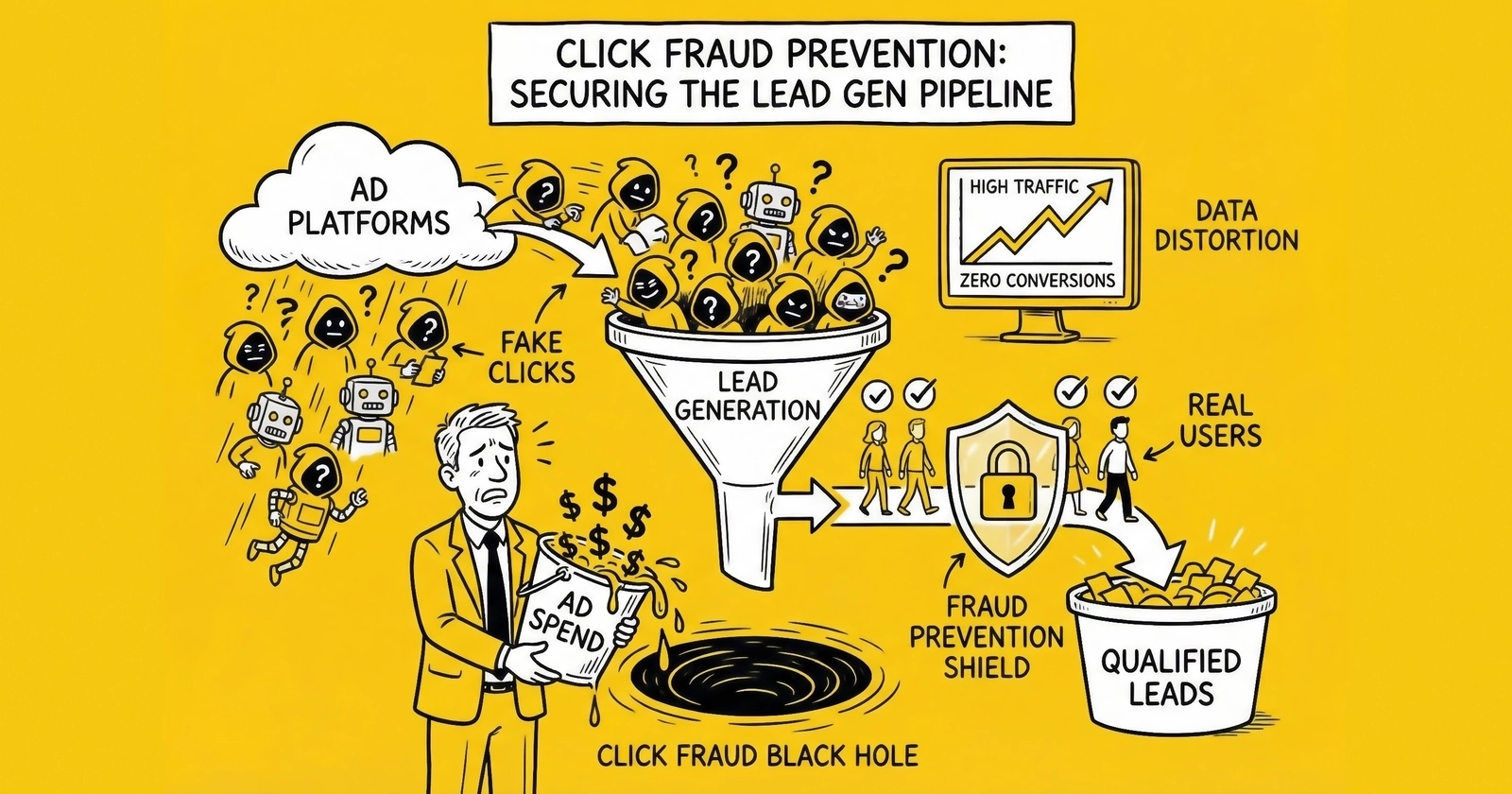
A platform-specific operations guide to click fraud detection on Google Ads and Meta, covering fraud signatures by channel, invalid click report interpretation, refund recovery documentation, and account protection tactics that actually move the needle.
Most click fraud guides treat Google Ads and Meta as interchangeable fraud surfaces. They are not. The fraud types that hit each platform differ structurally. The detection signals are different. The refund processes are completely different – one is transparent and credits after detection, one filters before billing and tells you almost nothing about what it removed.
Lead generators running $20,000+ monthly across both platforms need platform-specific knowledge, not generic advice about installing a fraud prevention tool. This guide covers what actually works on each platform: how to read their native fraud signals, build documentation packages that pass internal review, recover credits for charges you should not have paid, and structure campaigns to reduce exposure before fraud hits.
How Google Ads and Meta Handle Fraud Differently
The fundamental architecture of fraud handling differs between the two platforms, and this shapes everything – what you can detect, what you can claim, and how you document a refund case.
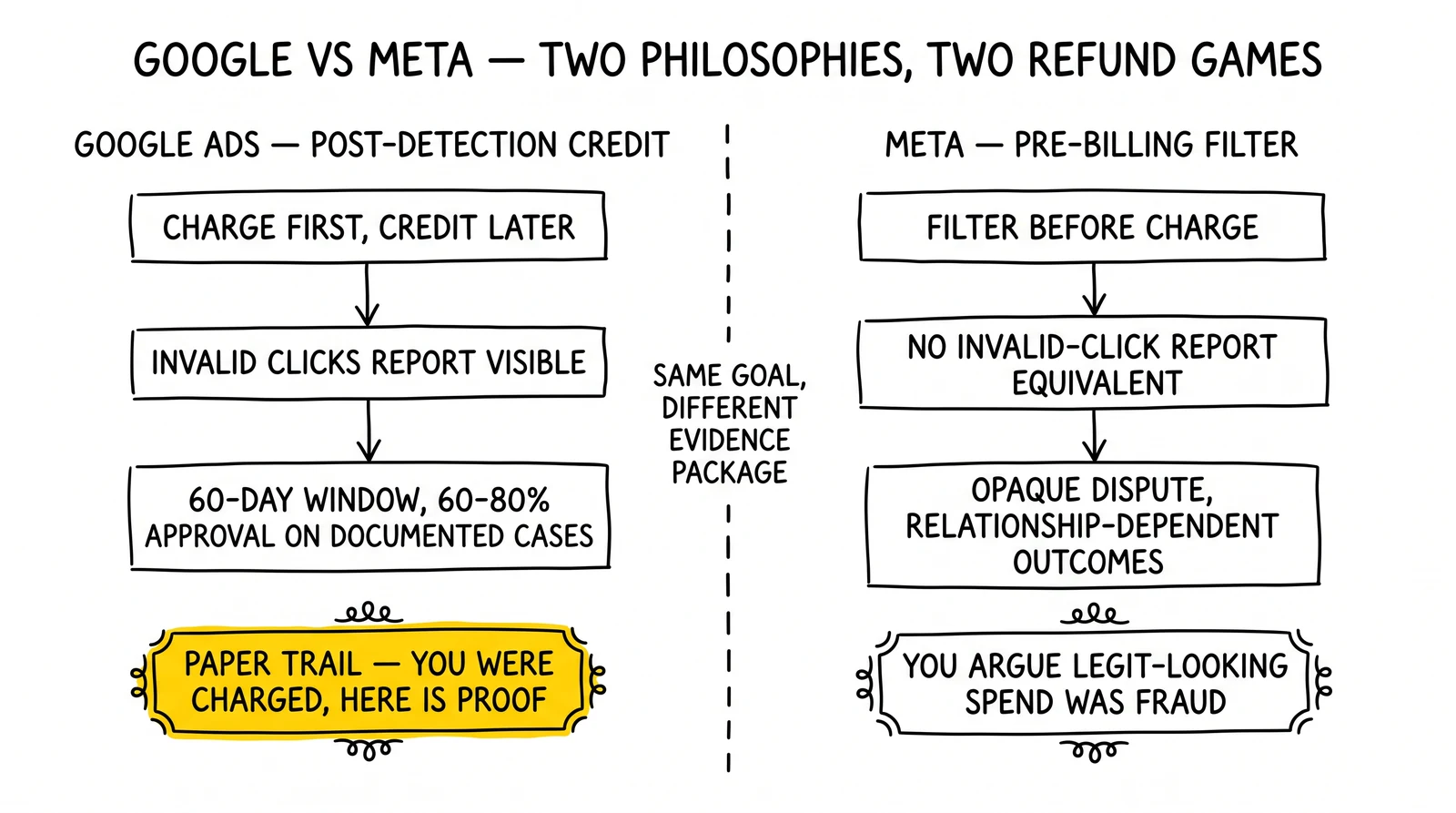
Google Ads operates a post-detection credit system. Google charges for clicks, then runs automated detection systems that identify invalid clicks after the fact. Credits appear in your account – typically within one to two billing cycles – for clicks Google’s systems flag as invalid. You can see these credits in the Invalid Clicks Report. What Google’s automated systems miss stays on your invoice. The refund process exists specifically to dispute charges for fraud that automated detection did not catch.
Meta operates a pre-billing filter. Meta’s systems filter what they classify as invalid activity before it reaches your invoice. You are not charged for the clicks Meta removes. What you cannot do is easily see what was filtered, in what volume, or whether their filter is catching the right things. The platform does not provide an equivalent of Google’s Invalid Clicks Report. When fraud slips through Meta’s pre-billing filter, the dispute process is opaque and outcomes are inconsistent.
This structural difference has practical implications:
- On Google, you have a paper trail: you were charged, the charge was wrong, here is the documentation
- On Meta, you are arguing that something that looks like legitimate spend is actually fraud that should have been filtered but was not
- Google’s refund process has defined criteria and documented steps; Meta’s is more relationship-dependent and less transparent
Google Ads: Fraud Patterns Specific to Search
Search-based lead generation on Google attracts specific fraud types that differ from display or programmatic channels. Knowing what to look for on search cuts investigation time significantly.
Competitor Click Fraud on Search
Search campaigns for high-value lead generation keywords – insurance quotes, mortgage rates, personal injury lawyers, solar installation – put you in direct auction competition with operators who benefit financially when you run out of budget. Competitor click fraud on Google search follows recognizable patterns.
Timing signatures. Competitor fraud typically concentrates during your peak conversion windows. If your legitimate leads come in heavily between 9 AM and 12 PM, expect competitor fraud attempts during those hours – not at 3 AM when your budget would exhaust without hurting your actual conversion rates. Fraud designed to exhaust your daily budget happens when that budget depletion actually removes you from auction.
Geographic clustering. Competitors operating in your market tend to be physically located in your market. If you run a national insurance campaign and suddenly see click clusters from specific metro areas where major competitors headquarter, that is a signal worth investigating. Pull the geographic breakdown in Google Ads (Campaigns > Audiences > Geographic) and compare it against your historical baseline.
IP range concentration. Corporate environments often route internet traffic through shared IP ranges. A company clicking your ads from their office network shows multiple clicks from the same IP or the same /24 block. The Google Ads interface does not expose IP-level data natively, but third-party tools like ClickCease or your server logs will show this. Flag any IP address appearing more than three times in a 24-hour period clicking the same campaign.
Budget depletion correlation. Pull your hourly impression share data. If your budget exhausts earlier than expected on days with elevated click volume from specific sources, and impressions drop while click volume stayed high, you are likely seeing budget drain behavior rather than organic traffic spikes.
Bot Traffic Signatures on Google Search
Bot traffic on Google search has changed significantly as detection has improved. Basic bots using data center IPs get caught by Google’s automated systems. What gets through looks increasingly human.
Residential proxy signatures. Sophisticated bots use residential proxy networks – IP addresses belonging to actual consumer devices that have been compromised or enrolled in proxy programs. These clicks appear to come from legitimate residential ISPs in your target geography. The tell is behavioral: residential proxy traffic shows zero time-on-page, no scroll depth, and form completion in 2-4 seconds. Real consumers in your target demographic do not behave this way.
Headless browser fingerprints. Modern bot frameworks (Puppeteer, Playwright, Selenium) run full browser sessions that pass basic bot detection. They have realistic user agents, accept JavaScript, and handle cookies. But headless browser sessions leave fingerprint artifacts that device fingerprinting tools catch: missing font enumeration results, WebGL renderer strings that do not match declared hardware, canvas fingerprint anomalies, and timing patterns in JavaScript execution that fall outside human ranges.
Velocity-per-keyword clustering. When bots target specific keywords rather than your account broadly, you see click volume spikes on individual keyword groups that do not match your impression-to-click patterns on adjacent keywords. Pull the search terms report filtered by the specific keywords showing anomalies. High click rates without corresponding conversion signals on specific terms – while other terms in the same campaign behave normally – indicates keyword-targeted bot activity.
Reading Google’s Invalid Clicks Report
The Invalid Clicks Report is your first diagnostic tool after you suspect fraud. Access it at: Reports > Predefined Reports (Dimensions) > Other > Invalid Clicks.
What the report shows:
- Invalid clicks: Clicks Google’s systems flagged and automatically credited
- Invalid click rate: Percentage of total clicks classified as invalid
- All conversions and cost columns: Segmented by these categories so you can estimate the spend you were not charged
What the report does not tell you:
- The reason specific clicks were classified as invalid
- The IP addresses or identifiers of invalid click sources
- Anything about clicks Google’s systems missed
Interpreting the numbers. An invalid click rate of 8-12% is typical for most verticals. Rates above 15% warrant investigation – either fraud activity is elevated, or you have a traffic source problem. Rates below 5% do not necessarily mean low fraud; Google’s detection has limits and the number reflects what was caught, not what occurred.
The gap between what Google catches and what actually hit. Google’s automated systems are effective against simple bots and known invalid sources. They are less effective against sophisticated residential proxy networks, click farms using human workers, and competitor clicks that stay below per-IP thresholds. The Invalid Clicks Report shows floor fraud detection, not ceiling fraud exposure.
Google Ads: Building a Refund Case
The Google Ads refund process rewards operators who treat it like a compliance investigation: specific documentation, concrete evidence, and a clear causal argument connecting the evidence to wasted spend.
What Google’s Review Team Actually Evaluates
Google’s invalid click investigation team looks for:
- Evidence specific to clicks you were charged for – not general claims about click fraud in your industry
- Technical indicators linking specific clicks to invalid activity – IP patterns, device signals, behavioral anomalies
- Conversion data showing the traffic did not produce genuine engagement – contact attempts that failed, leads that returned as uncontactable, zero time-on-site sessions from paid traffic
- Third-party tool documentation – reports from ClickCease, CHEQ, TrafficGuard, or similar platforms carry weight because they represent independent analysis
Vague submissions fail. “My CPL is high and I think I have click fraud” is not an evidence package. A file that contains 47 IP addresses, click timestamps for each, server log entries showing those IPs made requests without loading JavaScript, conversion data showing zero contact rate from those sessions, and a ClickCease report flagging the same IPs – that is an evidence package that gets reviewed seriously.
Step-by-Step Documentation Process
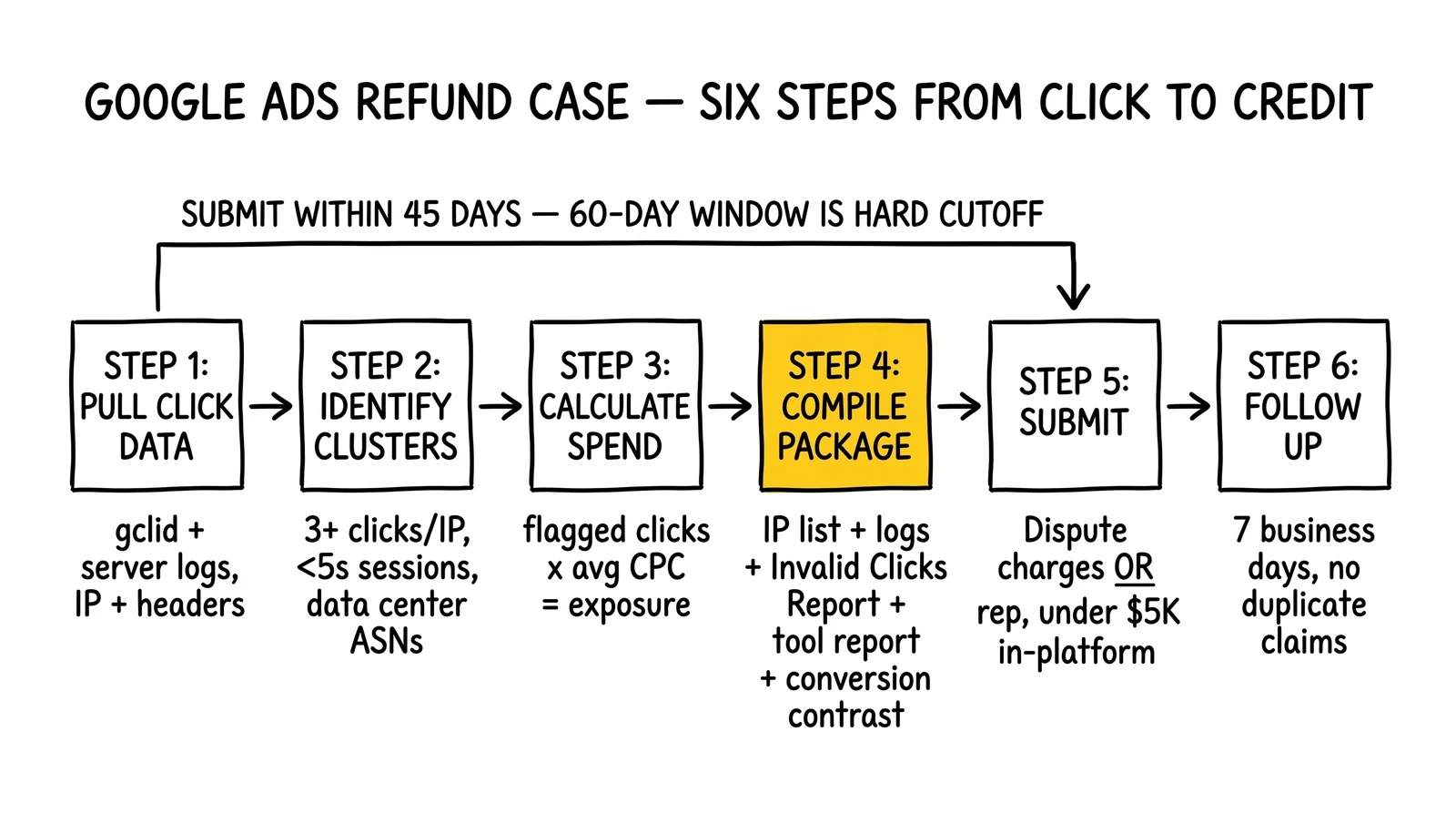
Step 1: Pull click data with maximum granularity.
In Google Ads, click-level data is not natively available at the IP level. To get this, you need server-side logging on your landing pages that records the gclid (Google Click Identifier) alongside the visitor’s IP address and request headers. If you have not already implemented this, do it now – it is the foundation of every future refund case.
With gclid logging in place, you can match specific Google Ad clicks to server-side session data and retrieve: IP address, user agent, referrer, headers present/absent, time of click, time of first page event (scroll, click, form interaction), and time of form submission if any.
Step 2: Identify suspicious click clusters.
From your server logs (or third-party tool exports), flag:
- Any IP appearing more than 3 times across a 7-day window for the same campaign
- Any IP that clicked but generated a session under 5 seconds with no page events
- Any IP from a data center IP range (cross-reference against ASN databases like BGP.tools or IPinfo)
- Any IP that submitted a form with completion time under 10 seconds
- Any IP that hit your form submission endpoint without first loading the form page
Step 3: Calculate the spend impact.
For each suspicious click cluster, calculate the spend: number of clicks × your average CPC for that campaign/keyword combination. Sum across all flagged IPs. This is your documented fraud exposure for the claim period.
Step 4: Compile the evidence package.
Your submission should include:
- A summary document: dates affected, total clicks, total spend, amount you believe fraudulent, percentage of spend affected
- IP address list with click timestamps and estimated spend per IP
- Server log excerpts showing the behavioral evidence for flagged IPs (missing headers, instant sessions, endpoint direct access)
- Screenshot or export from Invalid Clicks Report showing the claim period
- Third-party tool report if available (export as PDF, include date range matching your claim)
- Conversion data showing contact/conversion rates from flagged versus unflagged traffic – the contrast is compelling evidence
Step 5: Submit through the correct channel.
For spend under approximately $5,000 in disputed charges: use the in-platform dispute form at Tools & Settings > Billing > Billing Documents > select invoice > Dispute charges.
For larger disputed amounts or accounts with a dedicated Google Ads representative: submit directly through your rep with the documentation package attached. Representative-submitted cases receive more senior review.
Step 6: Follow up strategically.
Google’s stated SLA for invalid click investigations is 3-5 business days, but complex cases take 2-3 weeks. If you have not received a response in 7 business days, follow up through your support channel referencing your case number. Do not submit duplicate claims – this creates confusion in the review system.
Approval Rate Factors
Well-documented cases with IP-level evidence, server log support, and third-party tool reports achieve 60-80% approval rates based on industry reporting from operators and fraud prevention platforms.
Cases that fail typically lack specificity: they claim fraud without connecting the evidence to the specific clicks being disputed, or they submit tool reports without tying those reports to the invoice period in question.
The 60-day deadline is hard. Google’s review systems have limited access to billing and click data older than 60 days. Submit claims within 45 days to give yourself buffer time for follow-up before the deadline cuts off investigation.
Meta Ads: Fraud Patterns Specific to Social
Fraud on Meta operates differently because the ad format, targeting, and conversion paths differ from search. Lead generators running Meta campaigns – particularly Lead Ads, Messenger campaigns, or traffic campaigns to landing pages – encounter fraud types specific to the social environment.
Engagement Fraud on Meta
Meta’s algorithm optimizes for engagement signals: clicks, reactions, comments, shares, saves. This creates fraud incentives that do not exist on Google search.
Engagement pod activity. Coordinated groups of accounts engage with ads to push them into broader distribution through the algorithm. This inflates engagement metrics – making your ads appear to perform better than they do – while diluting the quality of actual leads generated. Engagement pod traffic tends to show high click-through rates but near-zero conversion rates.
Fake account click volume. Meta’s anti-fraud systems catch many fake account interactions, but the ones that slip through – particularly newer accounts with some authentic activity mixed in – register as valid engagement. Fake account traffic shows distinctive patterns: engagement activity clustered at unusual hours, accounts with profiles that show limited realistic history, and rapid sequential engagement from accounts with no mutual connections to your actual target demographic.
Incentivized traffic from Meta’s Audience Network. When your campaigns run on Meta’s Audience Network (extending beyond Facebook and Instagram to third-party apps and sites), you encounter publisher fraud similar to Google Display Network – sites and apps that incentivize clicks to inflate their ad revenue. This is the primary source of the volume anomalies that Meta filters pre-billing, but it is not always caught completely.
Conversion Fraud on Meta Lead Ads
Meta Lead Ads – where the lead form opens directly in the Meta interface – create a specific fraud pattern: automated form submissions with fabricated data.
Bot submissions through Lead Ads. Because Lead Ads pre-populate form fields from the user’s Meta profile, the barrier to bot submission is different than on landing pages. Bot accounts with plausible profile data can generate Lead Ad submissions that look legitimate at the platform level. The tell comes in conversion quality: phone numbers that fail validation, email addresses on temporary domains, and names that do not match the profile demographic.
Profile data injection. Some fraud operations use real Meta accounts with synthetic or stolen profile data to submit lead forms. These submissions pass Meta’s front-end validation because the account exists and the profile appears real. Detection requires lead-level validation on your end – phone validation APIs, email verification, and consistency checks between stated location and IP geolocation.
Understanding Meta’s pre-billing filter. Meta removes what it classifies as “invalid activity” before charging you. What it defines as invalid, what signals trigger removal, and what volume it removes are not publicly documented in detail. You can see total “invalid activity” numbers in some reporting views, but the granularity is limited compared to Google’s Invalid Clicks Report. This opacity makes it harder to know whether Meta’s filter is working well for your specific campaigns.
Reading Meta’s Fraud Signals
Meta does not offer an Invalid Clicks Report equivalent, but several signals in Ads Manager reveal traffic quality problems:
Frequency and reach disparity. If your frequency metric is climbing significantly while reach stays flat, you are showing ads to the same people repeatedly – which can indicate audience targeting has drifted toward a narrow, potentially low-quality segment.
Delivery efficiency score. Meta’s delivery system scores ad quality based on engagement signals. Sudden drops in delivery efficiency scores on previously stable campaigns – without creative changes – can indicate your campaign is attracting engagement fraud that is lowering your quality signals in Meta’s algorithm.
Landing page conversion rate vs. Meta-reported click-through rate. If Meta reports 1,000 link clicks but your landing page analytics shows 500 sessions, you have a 50% discrepancy that Meta’s own systems filtered (pre-billing) or that represents click-through inflation. A consistent 30-40% gap between Meta-reported clicks and analytics-recorded sessions is normal due to attribution differences; a 50%+ gap warrants investigation.
Breakdown by placement. In Ads Manager, break your results down by placement. Audience Network placements consistently show higher click rates and lower conversion rates than Facebook Feed or Instagram placements. If Audience Network is consuming a disproportionate share of spend with low conversion volume, consider restricting placements to Facebook and Instagram only – this immediately reduces exposure to publisher fraud from third-party inventory.
Meta Ads: Recovering Spend for Fraud That Passed the Filter
Meta’s refund process is less structured than Google’s, and outcomes depend more on account history and the specificity of your evidence.
What Meta Actually Reviews
When you request a review of suspected fraud spend on Meta, the review team examines:
- Whether the activity in question matches patterns in Meta’s internal fraud databases
- Your account history – advertisers with strong track records of well-performing campaigns get more credibility in disputes
- The quality of evidence you provide – click-level behavioral data is more compelling than aggregate reporting screenshots
Meta does not have the equivalent of Google’s documented dispute path. You are working through the Business Help Center with a support agent, not submitting to a formal billing dispute process.
Documentation for Meta Fraud Claims
From Meta Ads Manager:
- Export campaign data for the disputed period (CSV with reach, impressions, clicks, spend, conversions)
- Download breakdown reports by placement – highlighting Audience Network spend with low conversion rates
- Screenshot or export frequency data showing unusual audience concentration
From your landing page analytics:
- Session data for traffic attributed to Meta campaigns during the disputed period
- Session quality metrics: average session duration, bounce rate, pages per session
- Geographic breakdown – flag sessions from geographies outside your Meta targeting
- Form submission timing data if captured – sessions that submitted forms in under 10 seconds
From lead-level validation:
- Phone validation failure rates for leads from Meta campaigns during the disputed period (compared to your baseline)
- Email validation failure rates
- If you use TrustedForm or Jornaya, any cert data showing bot-pattern form completion behavior
From third-party tools:
- If running ClickCease on your landing pages, export the blocked/flagged traffic report for the campaign period
- If running CHEQ, export the threat intelligence report for the period
The Meta Dispute Process
- Go to Meta Business Help Center (business.facebook.com/help)
- Select your ad account
- Choose “Billing and payments” as the issue category
- Select “Dispute a charge” or “I think there’s an issue with how I was charged”
- Submit your documentation package through the file upload function
- Request escalation to a billing specialist (the initial support agent typically has limited authority to approve credits)
What Meta can offer:
- Ad credit to your account (most common outcome for approved cases)
- Extended campaign run to compensate for days where fraud affected performance
- Formal denial with no remedy
Unlike Google, Meta rarely provides explanation of why a dispute was approved or denied. Document all case numbers and communications.
Account relationship matters. Advertisers spending $50,000+ monthly with a dedicated Meta account representative have significantly more recourse than self-serve advertisers going through standard support. If your spend level qualifies for managed account support, use that relationship for fraud disputes rather than standard help center channels.
Ad Account Protection: Structural Tactics by Platform
Reactive fraud recovery – detection, documentation, refund request – is necessary but expensive in time. Structural campaign changes reduce exposure before fraud hits.
Google Ads Account Protection
IP exclusion maintenance. Google Ads allows up to 500 IP exclusions per campaign. This is a hard ceiling that requires management. Maintain a tiered approach: active exclusion list (IPs with confirmed fraud patterns), monitoring list (IPs showing suspicious signals but not yet confirmed), and retired list (IPs previously excluded that have been clean for 90+ days). Review and rotate the active list monthly.
Automated rules for budget protection. Set automated campaign rules (Tools & Settings > Bulk Actions > Rules) to pause campaigns when certain thresholds are hit: if click-through rate exceeds twice your historical average in a single day, pause and alert. This blunt-instrument protection prevents catastrophic budget drain from sudden bot attacks while you investigate.
Search network vs. search partners. When running Google search campaigns, you can opt out of search partner network traffic (Settings > Networks). Search partners include third-party sites that show Google search ads. Fraud rates on search partners are higher than on Google.com itself. For lead generation campaigns where every CPL dollar matters, restricting to Google.com only sacrifices some reach for meaningfully better traffic quality.
Dynamic Search Ads exclusions. If running DSA campaigns, fraudulent clicks can land on unintended pages. Maintain a thorough negative list for DSA campaigns and add page exclusions for any landing pages that have shown poor traffic quality.
Conversion tracking with offline conversion import. Connect your CRM to Google Ads through offline conversion import. When a lead actually converts downstream – answers the phone, becomes a customer – import that conversion back into Google. Smart Bidding algorithms trained on real downstream conversions deprioritize traffic sources that click but never convert, including many fraud sources. This does not prevent fraud, but it directs your bidding budget away from the inventory fraud concentrates on.
Target ROAS or Target CPA with conversion value rules. Assign conversion values based on lead quality signals you can measure at form submission: phone validation pass/fail, email domain quality, geographic match to your target market. By depressing the conversion value of low-quality submissions, you reduce the algorithm’s incentive to buy traffic from sources that produce them – which are often the same sources susceptible to fraud.
Meta Ads Account Protection
Placement restriction to core inventory. Turn off Audience Network entirely for lead generation campaigns. The additional reach comes with substantially higher fraud exposure from third-party publishers Meta has less control over. Restrict placements to Facebook Feed, Instagram Feed, Facebook Stories, and Instagram Stories. Yes, this limits reach and typically increases CPMs – but the CPM increase is often less than the fraud waste on Audience Network.
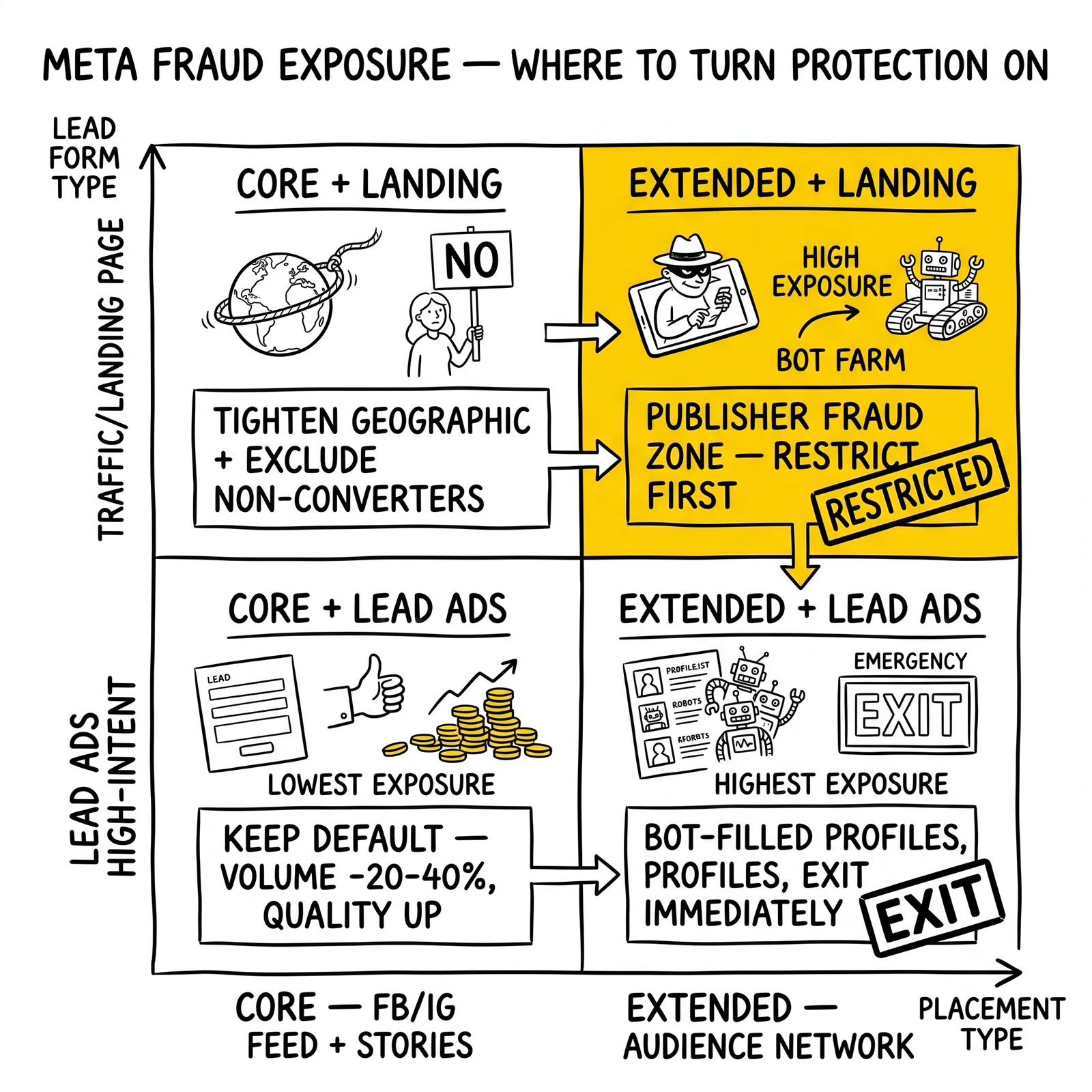
Geographic targeting tightening. Meta’s geographic targeting has broader interpretation than Google’s. “People who live in” is more fraud-resistant than “People in or recently in this location” or “People who show interest in this location.” Fraud operations using location spoofing tend to fail the “live in” filter more often.
Audience quality controls. Exclude audiences that historically show high click but low conversion rates. If you have run campaigns for 90+ days, build exclusion audiences from: people who clicked your ads but did not convert in the past 180 days, people who engaged with your ads but showed low engagement quality signals.
Lookalike audiences seeded on real customers. Seed lookalikes from your actual converted customer list rather than from website visitors or lead form completers. Converted customers represent fraud-clean conversions by definition; website visitors and even form completers may include fraud. A 1% lookalike of 500 verified customers outperforms a 1% lookalike of 10,000 form completers that includes 20% fraudulent submissions.
Lead form quality optimization. Within Meta Lead Ads, choose “Higher intent” form type over “More volume.” This adds a review step where the user confirms their information before submitting. It reduces form submission volume by 20-40% but significantly improves lead quality. For lead generators selling to buyers who pay more for quality – or who return low-quality leads – the volume reduction is worth it.
Automatic placements with performance-based exclusions. If you do run automatic placements, create a negative placement list by monitoring the placement breakdown weekly. Any placement (specific site or app in Audience Network) that generates 50+ clicks with zero conversions over a 30-day period gets excluded. Build this list systematically over time.
Cross-Platform Invalid Traffic Analysis
Lead generators running campaigns on both Google and Meta can use cross-platform data to triangulate fraud more effectively than either platform’s data alone.
Identifying Fraud Signals Across Platforms
If the same lead appears in your system from two different traffic sources in close time proximity – one from Google Ads and one from Meta – with identical data fields, that is almost certainly a form-fill bot that submitted across both platforms simultaneously. These multi-platform duplicate submissions are a strong fraud signal.
More practically: if a phone number or email address that failed validation from a Meta lead campaign appears again from a Google Ads campaign within 30 days, the same entity is hitting both platforms. Flag these for investigation and exclude the associated identifiers from future delivery.
Measuring Platform-Level Fraud Exposure
Calculate your fraud rate separately for each platform using the conversion quality methodology:
- Total leads from platform in the period
- Minus leads with failed phone validation
- Minus leads where no contact was made in 3 attempts over 48 hours
- Minus leads returned as invalid by buyers (if you sell)
- Divide remainder by total leads = contact quality rate
- (1 - contact quality rate) = estimated fraud rate
Do this calculation monthly for both Google and Meta, segmented by campaign type. The difference in fraud rates between platforms tells you where to concentrate protection investment.
If Google search campaigns show 8% fraud rate and Meta Audience Network campaigns show 31% fraud rate, the resource allocation decision is straightforward: tighten or eliminate Audience Network before investing more in sophisticated Google detection.
When to Escalate Beyond Standard Refund Processes
Standard dispute processes have limits. For fraud at significant scale, additional escalation paths exist.
Google Premier Partner escalation. If you work with a Google Ads agency that holds Premier Partner status, they have access to escalation paths not available to self-serve advertisers. Fraud investigations for Premier Partner clients often receive more senior review and faster resolution.
Formal complaint to FTC. For systematic fraud that platforms have not addressed – particularly competitor click fraud where you have strong evidence – filing a complaint with the FTC creates a record and can prompt platform-level investigations into the traffic sources you have identified.
Legal action framing. Competitor click fraud can constitute computer fraud under the Computer Fraud and Abuse Act and tortious interference with business relations. In practice, litigation is expensive and the evidentiary bar is high – you need to prove which specific competitor did it, not just that someone did. But the legal framing is sometimes useful in demand letters if you have strong IP-level evidence pointing at a specific competitor’s network.
Arbitration through platform terms. Google’s advertising policies include provisions for disputes that cannot be resolved through standard processes. Formal arbitration through the American Arbitration Association is available per Google’s Terms of Service. This path is rarely used but exists for significant unresolved disputes.
Frequently Asked Questions
What is the biggest difference between click fraud on Google and Meta?
Google charges first and credits later for detected fraud; you can dispute additional charges through a documented process. Meta filters before billing, so you are not charged for what their systems catch – but you cannot see what was removed, and disputing charges that slipped through their filter is less structured and more relationship-dependent.
How do I access Google’s Invalid Clicks Report?
In Google Ads: Reports > Predefined Reports (Dimensions) > Other > Invalid Clicks. The report shows clicks Google classified as invalid along with the credits applied. You cannot filter it by specific IP or fraud type – it shows aggregate invalid click volume by date, campaign, or ad group.
Why do my analytics sessions not match Meta’s reported clicks?
A 20-40% gap between Meta-reported link clicks and analytics-recorded sessions is normal due to attribution methodology differences. A gap above 50% indicates either significant pre-billing filtering by Meta (traffic they removed before charging) or click-through inflation. Break down by placement – Audience Network typically has larger discrepancies than core Meta placements.
How long does Google’s fraud investigation actually take?
Simple cases with strong documentation resolve in 3-5 business days. Cases requiring manual review of click-level data typically take 10-15 business days. Contested or complex cases – where Google’s initial assessment differs from yours and you request reconsideration – can take 4-6 weeks. Submit within 45 days of the suspicious activity to stay well inside the 60-day investigation window.
Does restricting to Google.com vs. search partners actually reduce fraud?
Yes, but the tradeoff is real. Search partners typically represent 15-25% of search campaign reach. Excluding them reduces that reach proportionally. For high-CPL lead generation in competitive verticals (insurance, legal, mortgage), the fraud rate differential is significant enough that restriction is usually worth the reach loss. Test both configurations and compare lead quality by source.
Do IP exclusions on Google Ads actually work against sophisticated fraud?
IP exclusions work against static-IP fraud sources and catch repeat offenders. They do not work against residential proxy rotation (which changes IPs with each request), large-scale botnets, or click farms (which spread activity across many IPs). Exclusions are a necessary baseline – not a complete solution. Layer them with behavioral detection (time-on-page, form completion timing) for meaningful protection.
How do I know if Meta’s pre-billing filter is working correctly?
You cannot directly audit Meta’s filter. Indirect signals: compare your Audience Network click-to-session ratio against core placement click-to-session ratio. If Audience Network shows 60% discrepancy and core placements show 25% discrepancy, Meta is filtering more Audience Network traffic – but something is still getting through. Your downstream lead quality metrics (contact rate, validation pass rate) are the cleaner signal.
What evidence actually gets Meta disputes approved?
Conversion data is more compelling than click-level data for Meta disputes, since Meta provides limited click-level transparency. Document: landing page session quality (bounce rate, time-on-site), lead validation failure rates compared to your historical average, contact attempt failure rates for the disputed period, and placement-level performance showing the specific placements where fraud concentrated. Cases with all four data types get more serious review than cases with only Ads Manager screenshots.
Key Takeaways
Google and Meta require different documentation strategies. Google’s post-billing credit system means you can dispute specific charges with IP-level evidence. Meta’s pre-billing filter means you are arguing that valid-looking charges represent fraud that should have been caught – a harder case requiring downstream quality data.
Google’s Invalid Clicks Report shows floor fraud exposure, not ceiling. What Google auto-credits is what their detection caught. The gap between that and your actual fraud rate is what a refund case addresses. Operators running $20,000+ monthly should audit this monthly.
Audience Network on Meta is the highest-risk placement for lead fraud. Restricting to core Meta placements reduces fraud exposure significantly, typically at a CPM cost increase of 15-30% – which is usually less than the waste rate on Audience Network for lead generation campaigns.
Structural protection pays more than reactive recovery. Google offline conversion import, Meta “Higher intent” lead forms, IP exclusion maintenance, and placement restrictions prevent fraud before it charges. Refund recovery is valuable but time-intensive – structural changes compound.
The 60-day window on Google is not negotiable. Build a monthly fraud audit into operations. Every month you let pass without reviewing click data and submitting documented claims is fraud spend you cannot recover.
Lead quality data is your strongest fraud evidence on both platforms. Contact failure rates, phone validation failures, and buyer return rates create a quantified fraud impact that both platforms find more compelling than technical click-level signals alone – particularly for Meta disputes where click transparency is limited.
Sources
-
Google Ads Help: Invalid Clicks – Documentation on Google’s invalid click detection and credit process, including how to access the Invalid Clicks Report and submit dispute requests.
-
Google Ads Help: Billing and payments – Official guidance on the billing dispute process and documentation requirements for invalid click claims.
-
Meta Business Help Center: Ad Charges – Meta’s explanation of how they handle invalid activity, pre-billing filtering, and the review request process.
-
ClickCease – Fraud prevention platform cited for competitor click detection, IP exclusion list automation, and invalid click rate benchmarks by vertical.
-
CHEQ – Enterprise fraud detection platform referenced for multi-platform fraud analysis methodology and audience protection capabilities.
-
TrafficGuard – Fraud prevention platform cited for mobile and Audience Network fraud pattern detection and publisher fraud identification.
-
IPinfo – ASN and IP intelligence database used for classifying click sources as consumer ISPs, data centers, or known proxy networks.
-
Juniper Research: Digital Advertising Fraud – Research source for global ad fraud scale estimates referenced for industry context.
Platform interfaces, refund process steps, and fraud detection capabilities change frequently. Verify current process steps directly with platform support before submitting fraud claims.