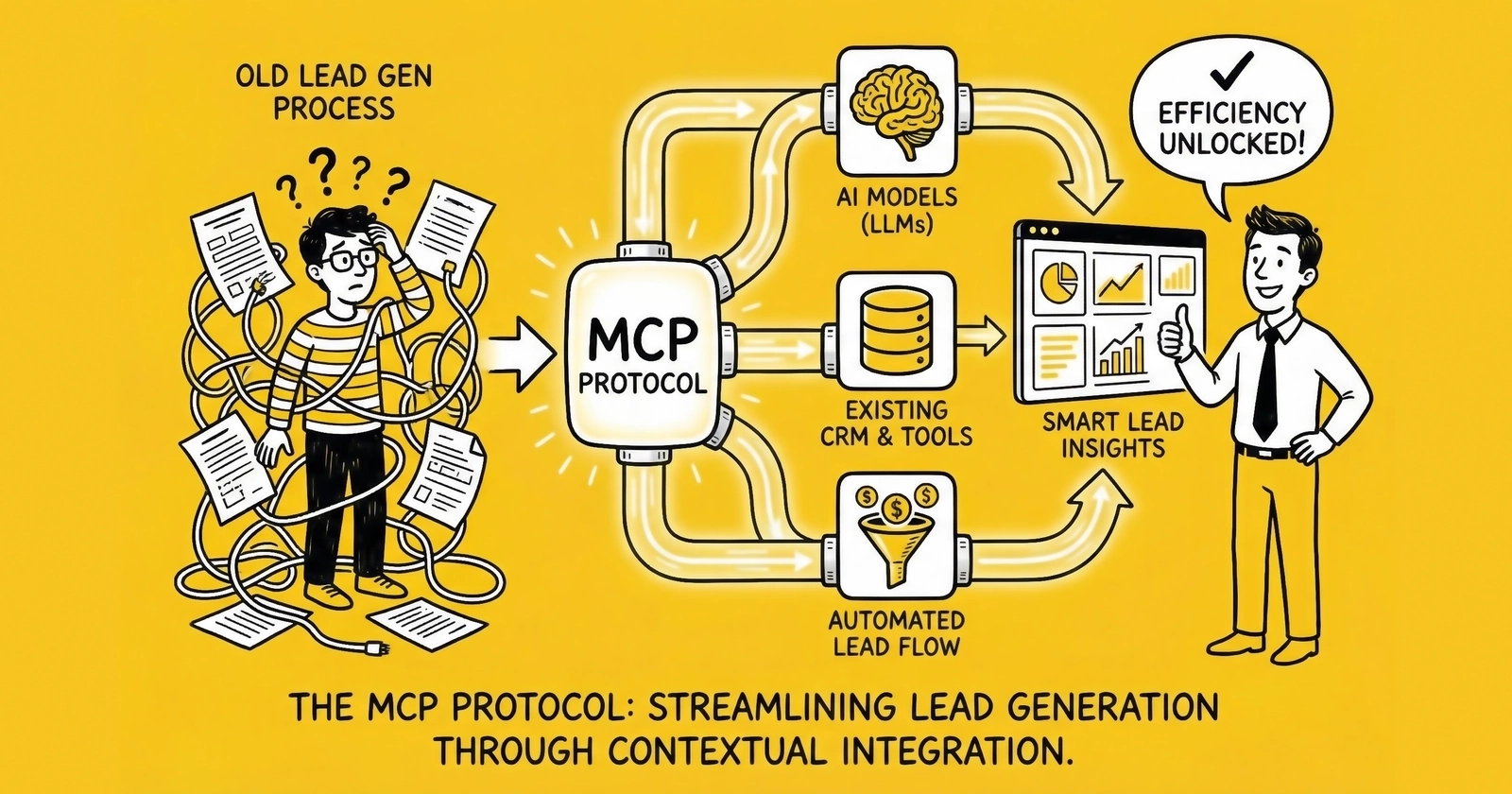
A field-level guide to connecting lead generation infrastructure – CRMs, ping-post platforms, consent systems, and distribution engines – to AI agents through MCP.
The lead generation industry runs on a stack of systems that don’t naturally talk to each other. A lead enters through a web form. TrustedForm captures a certificate. The lead pings to a distribution platform. Buyers bid in milliseconds. A winner receives delivery. The CRM logs the record. A compliance system files the audit trail. The contact center starts the five-minute clock.
Six systems. Zero native coordination. Everything stitched together with brittle custom integrations that break when any vendor changes an API.
Model Context Protocol addresses exactly this fragmentation – not as a theoretical architecture improvement but as a deployable standard with production adoption at scale. For lead generation operators, the relevant question isn’t what MCP is (the general explainer exists at MCP: The Protocol That United AI’s Biggest Rivals). The relevant question is which integrations matter for lead gen specifically, what they look like in practice, and where the real traps are.
This is that guide.
What Makes Lead Generation Unique as an MCP Use Case
Most MCP implementation guides focus on knowledge workers querying documents or developers accessing code repositories. Lead generation has a different profile entirely.
Time constraints are brutal. The five-minute rule means lead routing decisions need to happen in seconds, not minutes. An AI agent orchestrating lead distribution through MCP isn’t querying a database at human speed – it’s executing a chain of calls across compliance, routing, and CRM systems inside the window that separates a warm lead from a dead one. Latency in the MCP chain directly kills conversion rates.
Compliance isn’t optional. Connecting AI agents to lead distribution infrastructure without built-in compliance gates creates TCPA liability exposure. Every MCP tool call that triggers outbound contact needs to pass through consent verification, DNC checks, and state-specific calling hour validation. An AI agent that can route leads but can’t check compliance is more dangerous than no agent at all.
Money flows on every decision. Lead generation isn’t an internal productivity tool. Every routing decision involves real money – buyer bids, CPL commitments, return policies. An MCP integration that misconfigures tool permissions or passes wrong data between systems can misdirect leads, trigger returns, and breach buyer contracts.
Data quality is the product. The lead itself is the deliverable. MCP tools that enrich, validate, and score leads aren’t ancillary to the workflow – they determine what gets sold and at what price.
These constraints shape which MCP integrations matter and how to build them.
The Lead Gen MCP Stack
Rather than one monolithic integration, lead generation operators need a portfolio of MCP servers covering four functional layers.
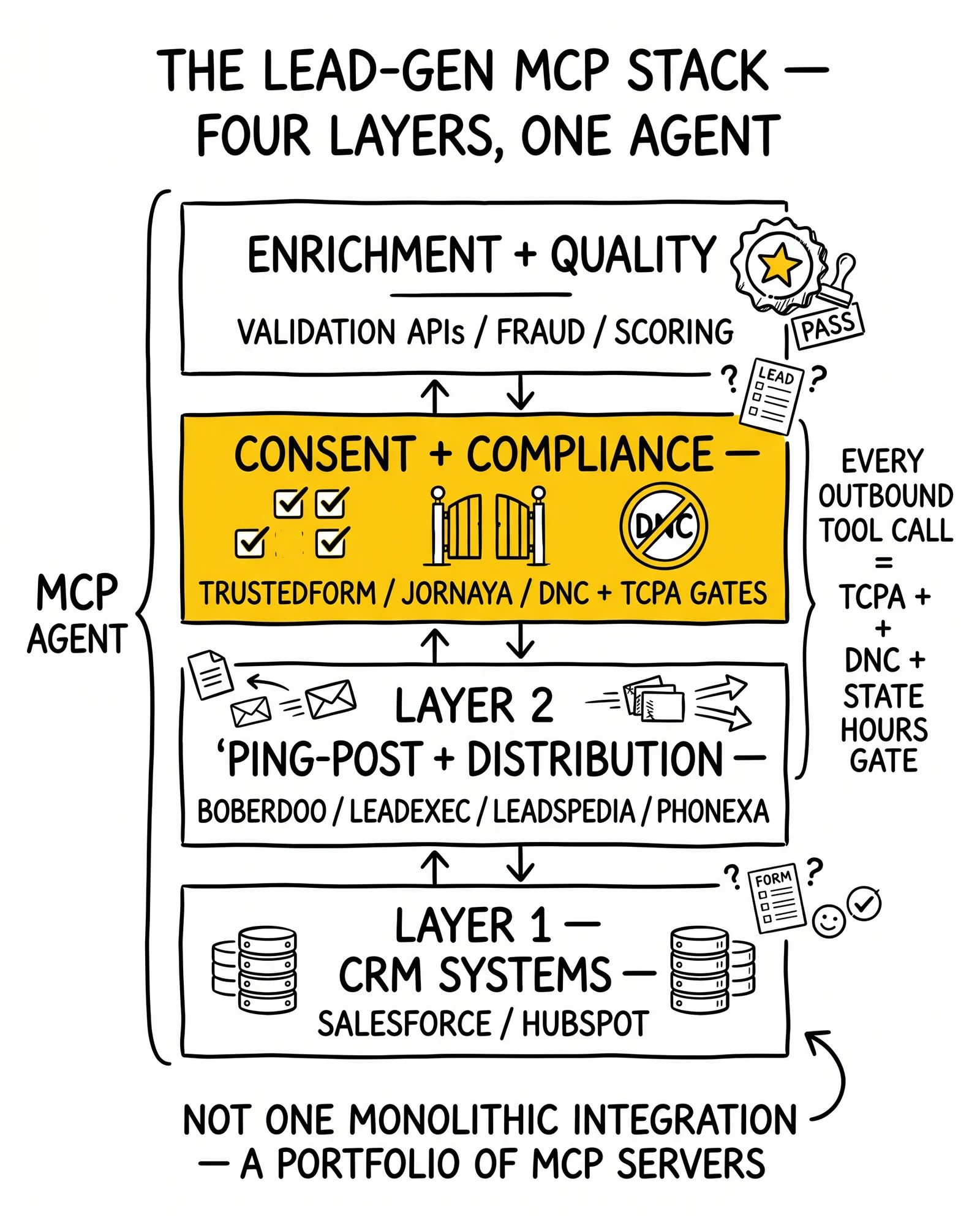
Layer 1: CRM Systems
The CRM is the record of truth for lead status, buyer assignments, and conversion outcomes. For operators running Salesforce or HubSpot, official and community MCP servers already exist.
HubSpot MCP Integration
The community HubSpot MCP server exposes contact management, company records, deal pipeline, and workflow triggers. For lead generation, the relevant tools are contact lookup (does this person already exist in the CRM?), contact creation (new lead inbound), property updates (lead status, routing assignment, buyer ID), and engagement logging (call attempts, email sends).
A practical HubSpot MCP workflow for inbound lead handling:
- Lead form submission triggers AI agent
- Agent calls
hubspot_search_contactswith email hash - If duplicate found, agent updates existing record with new submission data and flags as potential re-submission
- If new contact, agent calls
hubspot_create_contactwith validated lead fields - Agent calls
hubspot_create_deallinking contact to active campaign - Agent assigns deal to buyer account via
hubspot_update_deal
The entire sequence runs through standardized MCP calls. Swap HubSpot for Salesforce and the agent logic stays the same – only the MCP server changes.
Salesforce MCP Integration
Salesforce MCP servers (community implementations; the official Salesforce MCP server launched in 2025) support SOQL queries, lead record creation, opportunity management, and campaign association. For lead generation operations running Salesforce as their system of record, this matters at the bulk distribution layer – not just inbound lead capture but batch matching, buyer account management, and conversion tracking.
Key Salesforce tools for lead gen:
salesforce_query– SOQL to pull buyer capacity, existing lead records, campaign rulessalesforce_create_lead– Standard lead object with all required fieldssalesforce_update_record– Route assignment, status change, buyer attributionsalesforce_create_task– Contact attempt scheduling with appropriate delay logic
One gap worth noting: community Salesforce MCP servers vary in authentication robustness. Any production Salesforce integration needs OAuth 2.0 configured correctly – not session tokens that expire mid-batch.
Layer 2: Ping-Post and Distribution Platforms
Ping-post is where MCP gets interesting for lead generation. The traditional ping-post flow is a deterministic sequence – lead arrives, ping goes to qualified buyers, highest bid wins, post delivers lead. AI agents connected via MCP can make this decisional rather than mechanical.
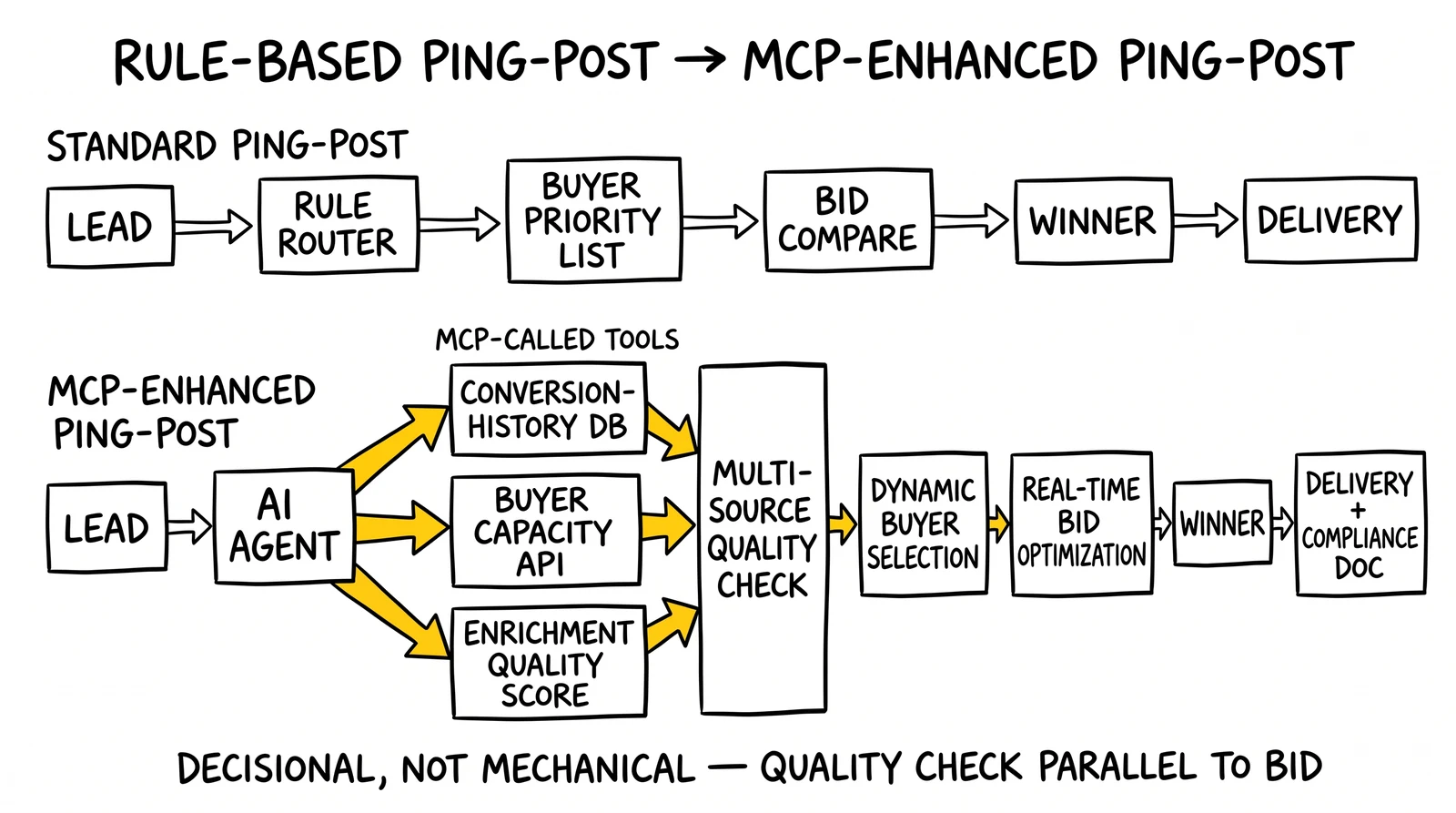
The AI-Enhanced Ping-Post Architecture
Standard ping-post: Lead → Rule-based router → Buyer priority list → Bid comparison → Winner → Delivery
MCP-enhanced ping-post: Lead → AI agent (via MCP) → Multi-source quality check → Dynamic buyer selection → Real-time bid optimization → Winner → Delivery with compliance documentation
The difference is the quality check step. An AI agent with MCP access can simultaneously query:
- Historical conversion rates for this lead source (database MCP server)
- Current buyer capacity and bid ceiling (distribution platform MCP server)
- Lead quality score from enrichment data (enrichment API MCP server)
- Compliance status (TrustedForm/consent MCP server)
Then make a routing decision that weights all four factors rather than following a static priority list.
Connecting boberdoo, LeadExec, and LeadsPedia
boberdoo, ClickPoint Software’s LeadExec, and LeadsPedia are the most common lead distribution platforms in the independent operator space. LeadExec represents the earliest publicly reported MCP work in the lead-distribution segment – an internal MCP layer currently powers an in-product AI agent over its existing API surface, and ClickPoint has signaled public MCP server exposure as a roadmap priority. boberdoo and LeadsPedia have not published official MCP servers as of April 2026 but expose REST APIs that can be wrapped in custom MCP servers – a one-time build that enables AI-agent access to distribution logic. LeadExec’s early-mover position on MCP matters competitively: agent-readable tool definitions ship as a platform feature rather than a per-operator integration project, and ClickPoint is positioned to expose those tools publicly earlier than competitors have publicly announced as buyer-side procurement agents enter production.
A custom boberdoo MCP server needs to expose:
get_buyer_list– Active buyers with current caps and pricingsubmit_ping– Send lead data for bidding (returns bid amounts without delivering)submit_post– Deliver lead to winning buyerget_lead_status– Check routing outcome and buyer acceptanceupdate_lead_caps– Adjust buyer caps in response to return patterns
The build isn’t complex – roughly 200-300 lines of Python wrapping the existing boberdoo REST endpoints. The payoff is that any MCP-compatible AI agent can then orchestrate distribution decisions without custom integration code for each new AI model or workflow.
Real-Time Bidding Through MCP
Real-time bidding in lead gen moves faster than most MCP tool chains are optimized for. The challenge: a ping-post sequence typically completes in under three seconds. An MCP tool chain calling four servers sequentially could easily blow that window.
The solution is parallel tool calls. MCP clients can issue concurrent requests to multiple servers rather than waiting for each to complete. An agent checking TrustedForm, querying buyer capacity, and pulling lead quality scores simultaneously rather than sequentially can complete the full chain in the time it would take to query one server serially.
This requires MCP clients that support concurrent tool calls – Claude’s API supports this natively. Custom agent implementations need to be built with async execution in mind, not sequential call patterns.
Layer 3: Consent and Compliance Systems
TCPA compliance is not optional infrastructure – it’s the guard rail that keeps lead generation businesses out of class action litigation. MCP integrations into consent systems need to be treated as security-critical, not as convenience features.
TrustedForm MCP Integration
TrustedForm doesn’t have a published MCP server. The ActiveProspect API, which underlies TrustedForm certificate verification, can be wrapped in a custom MCP server. The tools that matter for compliance automation:
verify_trustedform_certificate– Check certificate validity, age, and metadataget_certificate_consent_language– Extract the exact consent language captured at form submissioncheck_certificate_retention– Confirm certificate has been claimed and retained per buyer requirementsget_certificate_metadata– Page URL, IP address, timestamp, session data
For lead routing workflows, the TrustedForm check should run before the ping – not after. Delivering a lead to a buyer with an invalid or expired certificate creates buyer return exposure and potential TCPA liability. The MCP workflow should fail hard (block routing) if certificate verification fails, not soft-fail (route anyway, flag for review).
Jornaya LeadiD Integration
Jornaya’s LeadiD provides an alternative or complementary consent verification layer. The Jornaya API exposes lead history data – when was this phone number first seen, what other lead forms has it been submitted to, what is the lead’s activity history.
A custom Jornaya MCP server exposing:
get_lead_history– Submission history for phone/email combinationcheck_universal_leadid– Verify the LeadiD token attached to submissionget_contact_frequency– How many times has this contact been submitted recently
The Jornaya data is particularly valuable for identifying serial submitters – contacts who flood multiple lead forms simultaneously and have very low conversion rates. An AI agent with MCP access to Jornaya history can flag these leads before routing rather than discovering the pattern in return data three weeks later.
DNC and State Compliance Automation
The National DNC Registry requires manual lookups through FCC-approved scrubbing services. State mini-TCPA laws (Florida’s FTSA, Texas OTSA, Oklahoma’s equivalent) add calling hour restrictions, consent requirements, and per-call penalty exposure that varies by geography.
A compliance MCP server for lead generation should expose:
check_dnc_status– Query phone number against internal DNC list and registered scrubbing serviceget_state_calling_hours– Return current allowed calling window for lead’s state (accounting for time zones and state-specific rules)verify_consent_requirements– Check whether consent captured meets requirements for lead’s state (some states require PEWC for any automated outreach)log_compliance_check– Write compliance verification result to audit trail
The audit trail logging tool matters as much as the verification tools. TCPA defense requires documentation that compliance checks ran before contact attempts. MCP tool calls that execute verification but don’t log the result provide no evidentiary protection.
Layer 4: Lead Validation and Enrichment
Lead quality is determined before routing – or it’s determined by the buyer’s return rate, which is a worse way to learn. MCP integrations into validation and enrichment services let AI agents make quality-adjusted routing decisions rather than routing everything and sorting out the damage later.
Phone Validation
Phone validation APIs (Twilio Lookup, IPQS, Numverify) confirm whether a number is real, active, wireless vs. landline, and whether it’s associated with a VoIP service (a common fraud signal). A phone validation MCP server exposes:
validate_phone– Line type, carrier, active status, portabilitycheck_phone_risk_score– Fraud probability based on number behavior patternsget_carrier_info– Carrier name and type (relevant for TCPA wireless/landline rules)
The landline vs. wireless distinction matters for TCPA compliance – the rules for contacting wireless numbers with automated dialers are stricter than for landlines. An MCP phone validation call that returns line_type: landline changes the compliance workflow downstream.
Email Verification
Email validation (ZeroBounce, NeverBounce, Kickbox) catches disposable addresses, invalid domains, and role-based emails that indicate low intent. For lead generation, email deliverability directly affects nurture sequence performance and buyer conversion rates.
Email verification MCP tools:
verify_email– Deliverability check, disposable domain flag, role address detectionget_domain_reputation– Domain age, MX record status, spam blacklist statuscheck_email_activity– Last known activity date for email address (where available)
Address Standardization
USPS address validation (via SmartyStreets, Melissa Data, or similar services) is particularly relevant for home services verticals (solar, HVAC, roofing, mortgage) where service area eligibility depends on accurate geography. An AI agent with MCP access to address validation can confirm a lead’s address exists and is serviceable before routing to a buyer with coverage restrictions.
Third-Party Enrichment
Data enrichment services add firmographic data (for B2B leads), property data (for homeowner-focused verticals), credit indicators (for mortgage and financial product leads), and demographic overlays. The MCP integration pattern is a tool call that takes validated lead PII and returns an enrichment payload – then the agent uses that data in its routing decision.
For solar leads specifically, property data is often the routing-determinant factor. A lead from a renter gets routed differently (or not at all) from a lead from a homeowner with a south-facing roof and utility bills in the right range. An AI agent with MCP access to a property data API can make that determination in real time rather than relying on self-reported form data.
Building the Full Orchestration Workflow
Individual MCP integrations matter less than the orchestration layer that connects them. Here’s what a production-grade AI-orchestrated lead processing workflow looks like across all four layers.
Inbound Lead – Full MCP Orchestration
Step 1: Initial Validation (parallel calls)
- Phone validation MCP server → line type, risk score
- Email verification MCP server → deliverability status
- Address standardization MCP server → USPS-confirmed address
If any hard validation fails (invalid phone, disposable email), the workflow terminates here and the lead is logged as invalid – no further processing, no buyer exposure.
Step 2: Compliance Check (parallel calls)
- TrustedForm MCP server → certificate validity and consent language
- Jornaya MCP server → lead history and submission frequency
- DNC/compliance MCP server → DNC status, state calling hours, consent requirements
If TrustedForm certificate is expired or missing, or if DNC status is positive, workflow terminates with compliance block – logged with full audit trail.
Step 3: Enrichment (parallel calls)
- Property data MCP server (for homeowner verticals) → ownership status, property characteristics
- Firmographic data MCP server (for B2B) → company size, industry, decision-maker verification
- Intent data MCP server (where available) → recent research behavior, competitor engagement
Step 4: Lead Scoring
Agent synthesizes validation, compliance, and enrichment data into a quality score using defined rules or a scoring model. Score gates downstream routing – low-score leads may route to lower-tier buyers or reject entirely.
Step 5: Distribution (sequential with conditional branching)
- Distribution platform MCP server → ping to qualified buyers (based on score tier, geography, vertical)
- Receive bids, select winner based on quality-adjusted yield (not just highest bid)
- Distribution platform MCP server → post to winning buyer
- CRM MCP server → create/update lead record with buyer assignment, score, routing rationale
Step 6: Audit Trail
- Compliance MCP server → log full compliance verification results with timestamps
- Database MCP server → write complete transaction record including all tool call results
Total elapsed time for a well-optimized implementation: under three seconds for steps 1-4 and step 6; step 5 is gated by buyer response time, typically one to two seconds.
Implementation Sequencing for Operators
Most lead generation businesses can’t implement all four layers simultaneously. The practical sequencing depends on where the highest pain is.
Sequence A: Compliance-First (Recommended for High-Volume Operators)
Operators processing more than 500 leads per day face asymmetric downside from compliance failures. The ROI of automating compliance verification is immediate: fewer buyer returns, documented audit trail, reduced manual review burden.
- Weeks 1-2: Deploy TrustedForm MCP server (custom wrapper around ActiveProspect API). Test with non-production leads.
- Weeks 3-4: Deploy DNC/compliance MCP server. Integrate with existing scrubbing service.
- Weeks 5-8: Connect both to AI agent orchestration layer. Run parallel to existing manual workflow for validation period.
- Weeks 9-12: Cut over primary workflow to AI-orchestrated compliance. Maintain manual review for edge cases.
Sequence B: CRM Integration First (Recommended for Agencies and Buyers)
Lead buyers running CRM-based follow-up workflows benefit most from MCP-automated CRM population – fewer manual entries, consistent data formatting, immediate routing to sales queues.
- Weeks 1-3: Deploy CRM MCP server (HubSpot or Salesforce). Map lead fields to CRM schema.
- Weeks 4-6: Connect inbound lead delivery endpoint to AI agent. Agent handles CRM population automatically.
- Weeks 7-10: Add lead scoring layer using enrichment MCP server. Score flows into CRM with each lead record.
- Weeks 11-16: Add outbound coordination (contact scheduling, follow-up sequencing) through CRM MCP tools.
Sequence C: Distribution Optimization First (Recommended for Aggregators and Networks)
Operators running ping-post networks have the most to gain from AI-optimized routing – quality-adjusted bid selection typically improves net yield 10-20% over static priority lists within 90 days.
- Weeks 1-4: Build custom distribution platform MCP server (boberdoo, LeadsPedia, or proprietary system).
- Weeks 5-6: Deploy phone and email validation MCP servers.
- Weeks 7-10: Connect AI agent to orchestrate validation → scoring → ping → post sequence.
- Weeks 11-16: Add historical performance data (database MCP server) to routing decision. Agent uses conversion history in bid selection logic.
Security and Compliance Architecture
Lead generation MCP deployments handle PII and financial transactions – the security requirements are not casual.
Authentication on Every Server
MCP’s specification supports OAuth 2.0 authentication between clients and servers. Many community MCP servers ship without authentication enabled by default. Any lead generation MCP server – custom or community – needs OAuth 2.0 configured before handling real lead data. The November 2025 CVE-2025-6514 (shell command injection in mcp-remote) affected development environments that had skipped authentication setup.
Network Segmentation
MCP servers that access CRM data, consent records, or lead PII should not be internet-exposed. Place MCP servers inside the same network boundary as the systems they wrap. Use MCP over stdio (local process) or authenticated HTTP over a private network segment – not open HTTP endpoints accessible from the public internet. A 2025 security scan of internet-facing MCP servers found widespread authentication gaps.
Audit Logging for Every Tool Call
Every MCP tool call that touches lead data or compliance systems should be logged: timestamp, tool name, input parameters (excluding raw PII where possible), result code, and agent context. This log is both an operational debugging resource and a compliance artifact. TCPA defense in litigation requires documenting that consent was verified before contact. Agent logs showing compliance MCP tool calls provide that documentation.
Tool Poisoning Risk
Tool poisoning – malicious instructions embedded in data that cause AI agents to behave unexpectedly – is a real attack vector for lead generation systems. An enrichment MCP server returning crafted data could theoretically manipulate an agent’s routing decision. Validate tool outputs against expected schemas before using them in downstream decisions. Don’t let raw enrichment data flow directly into routing logic without sanitization.
Least Privilege Tool Access
Each AI agent should access only the MCP servers it needs for its specific workflow. A compliance-checking agent doesn’t need CRM write access. A distribution agent doesn’t need access to financial billing systems. Scope permissions at the agent level, not the infrastructure level.
Common Failures in Lead Gen MCP Deployments
Treating Compliance as a Feature, Not a Gate
The most dangerous implementation pattern is building compliance verification as a flag rather than a hard stop. If the TrustedForm certificate check returns invalid and the agent routes the lead anyway with a “compliance_flag: true” note, the operator has built a documentation trail proving they knew about the problem and proceeded. Hard gates – routing terminates if compliance check fails – are the only safe architecture.
Underestimating Latency
Sequential MCP tool calls in a ping-post context will kill conversion rates. A five-step sequential chain at 400ms per call is two seconds of added latency before the ping even goes out. Build for concurrent calls from the beginning. Profile the tool chain with realistic load before putting it in the path of live distribution.
Building Custom Servers for Everything
The MCP ecosystem has pre-built servers for HubSpot, Salesforce, PostgreSQL, Slack, and dozens of other systems. Before wrapping any system in a custom MCP server, check the current ecosystem – community server quality has improved substantially as adoption has scaled. Custom builds make sense for proprietary systems (boberdoo, LeadsPedia, internal databases). They’re unnecessary overhead for commodity systems with existing servers.
Skipping the Parallel Workflow Period
Running the MCP-orchestrated workflow in parallel with the existing manual workflow (and comparing outputs) before cutting over prevents unexpected failures from hitting live distribution. Two to four weeks of parallel operation catches edge cases – what happens when TrustedForm returns a timeout? What if the CRM is temporarily unreachable? – before they’re production problems.
Over-Permissive Agent Access
Giving an AI agent write access to systems it only needs to read from is a configuration mistake that can have serious consequences. An agent that can create and modify CRM records when its actual workflow only needs to query them is a misconfiguration waiting to cause problems. Define the minimum tool set for each agent workflow and configure accordingly.
ROI Framework for Lead Gen MCP Investment
The ROI case for MCP in lead generation doesn’t require speculative assumptions. The cost savings and revenue impacts are measurable at each integration layer.
Compliance Automation
A single TCPA class action settlement averages over $1 million in plaintiff payments plus legal fees. That’s a catastrophic outcome that compliance automation exists to prevent. Beyond the tail risk, automated compliance checking reduces buyer returns from consent issues – typically 3-8% of leads returned industry-wide. Reducing return rates by 2 percentage points on 10,000 monthly leads at $30 CPL is $6,000 per month in recovered revenue.
Routing Quality Improvement
Quality-adjusted routing – sending higher-quality leads to buyers who pay more for quality rather than defaulting to static priority lists – typically improves net yield 10-20% on existing lead volume. At 10,000 leads per month at a $30 average CPL, a 15% yield improvement is $45,000 in additional monthly revenue without changing lead volume.
Integration Cost Reduction
Custom CRM and distribution integrations typically cost $20,000-50,000 in development time and 20-30% of that annually in maintenance. A custom MCP server wrapping the same system costs $10,000-20,000 to build and is reusable across any MCP-compatible AI client. Over three years, the maintenance cost reduction alone justifies the MCP approach.
Operational Scale
Manual lead review at any meaningful volume requires staffing. An AI agent processing leads through MCP-connected compliance, validation, and routing systems can handle 1,000 leads per hour with consistent accuracy. The same throughput manually requires multiple full-time reviewers. The staffing math is straightforward.
What to Expect in 2026
The lead generation MCP ecosystem is early. As of early 2026, there are no published official MCP servers from TrustedForm, Jornaya, boberdoo, or LeadsPedia. That will change – the demand is clear and the protocol has the industry backing to remain the standard. Operators who build custom MCP servers for these systems today will migrate to official servers as they become available without rebuilding their agent logic.
The more significant shift is the emergence of AI agents that don’t need human-configured routing rules – agents that learn from conversion outcome data flowing back through the CRM MCP connection and continuously adjust routing decisions. That capability requires the data access that MCP provides. It’s not achievable with siloed systems connected by batch file transfers.
Lead generation at scale in 2026 and beyond requires real-time coordination across compliance, validation, distribution, and CRM systems. MCP is the protocol that makes that coordination possible without rebuilding it from scratch for every new AI model or workflow.
Key Takeaways
-
Lead generation has unique MCP requirements – sub-three-second latency constraints, hard compliance gates, and financial consequences for routing errors that generic enterprise MCP guides don’t address.
-
Compliance systems are the highest-priority integration – TrustedForm, DNC checking, and state-specific consent verification should be hard gates in the routing flow, not optional checks.
-
Ping-post platforms need custom MCP servers – boberdoo, LeadsPedia, and proprietary distribution systems don’t have published MCP servers yet; custom wrappers are a one-time build with multi-year reusability.
-
Concurrent tool calls are not optional – sequential MCP calls in a ping-post context add unacceptable latency; agent architectures must support parallel tool execution from the start.
-
Authentication and network segmentation are non-negotiable – lead PII and consent records flowing through MCP servers require OAuth 2.0 authentication and private network placement, not internet-exposed endpoints.
-
CRM MCP integration enables conversion feedback loops – routing decisions improve when agents can query historical conversion outcomes; this requires CRM read access in the routing agent’s tool portfolio.
-
The three-sequence implementation approach – compliance-first, CRM-first, or distribution-first depending on where current pain is highest – avoids trying to build everything simultaneously.
-
Parallel workflow validation periods prevent live failures – run MCP-orchestrated workflows alongside existing manual workflows for two to four weeks before cutover.
-
Tool poisoning is a real attack vector – validate MCP tool outputs against expected schemas before using enrichment data in routing decisions.
-
The ecosystem is early – official MCP servers for lead-gen-specific systems are coming; operators who build custom servers now will migrate without rebuilding agent logic when official servers ship.
Sources
- Anthropic – Introducing the Model Context Protocol
- Model Context Protocol – Official Documentation
- Model Context Protocol Specification (2025-11-25)
- ActiveProspect – TrustedForm API Documentation
- Linux Foundation – Agentic AI Foundation Announcement
- NVD – CVE-2025-6514 mcp-remote vulnerability
- FCC – TCPA Regulations and One-to-One Consent Rule