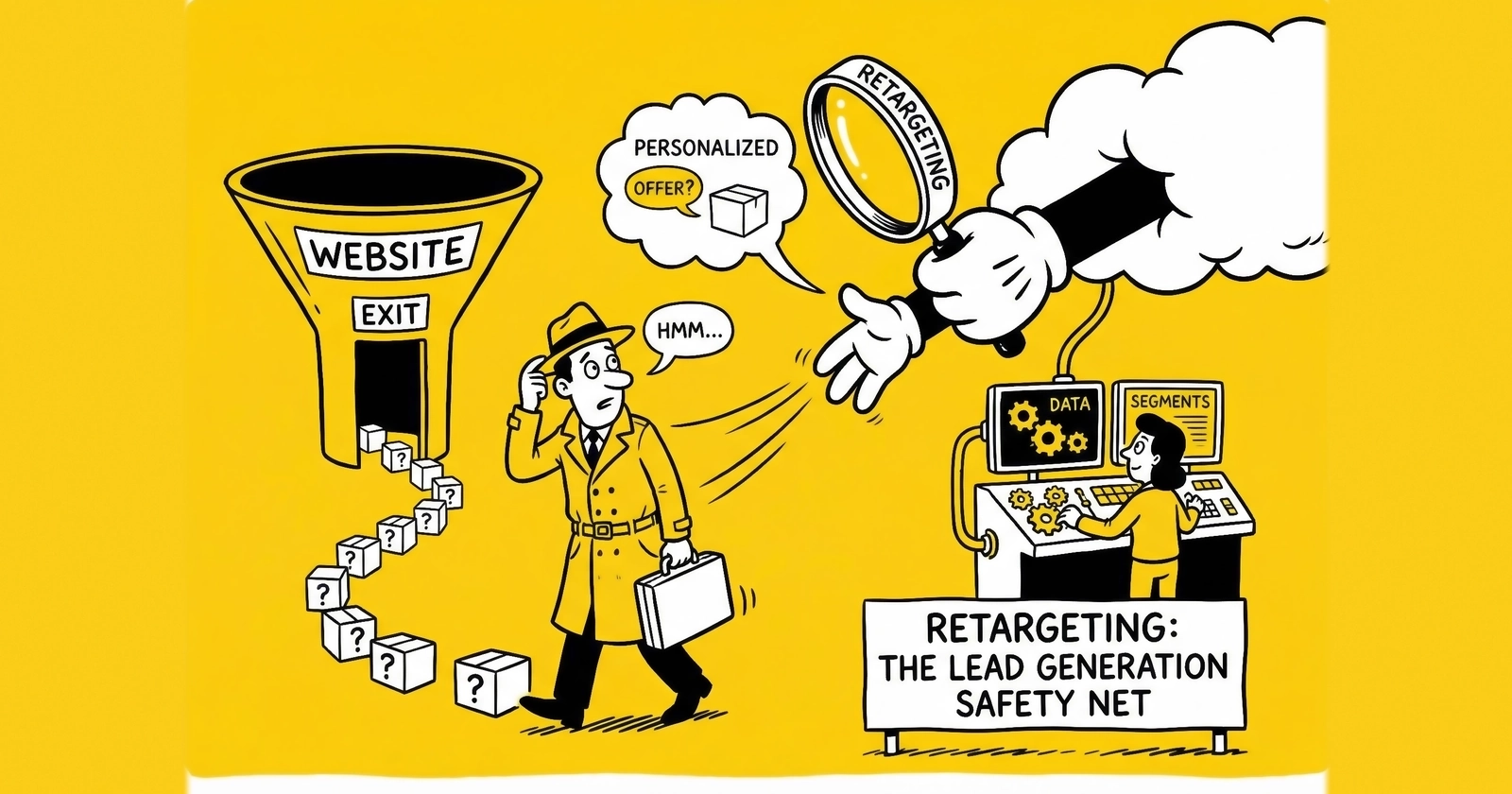
Retargeting fails in predictable ways. The pixel fires. The audience builds. The campaigns run. And then one of three things happens: the same converted lead sees lead capture ads for two weeks after submitting, a browser visitor who bounced after three seconds receives 47 ad impressions in five days and develops an active hostility toward the brand, or the holdout test reveals that 65% of retargeting conversions would have happened without the ads.
None of these failures is a strategy problem. They are implementation problems. The strategic case for retargeting – reaching visitors who demonstrated intent by arriving at a lead form – is sound. The execution layer is where most operations leave money on the table or burn money actively.
This guide focuses on the technical implementation: how to configure tracking pixels and server-side event APIs across the major platforms, how to structure audience windows and membership rules, how to build exclusion lists that suppress already-converted visitors, how to configure frequency caps that prevent the overexposure that destroys response rates, and how to approach cross-platform audience synchronization in an environment where deterministic matching has become harder to achieve.
The Tracking Foundation: Pixels, CAPI, and the Gap Between Them
Retargeting runs on audience data. Audience data comes from tracking. Before configuring any audience segment or frequency cap, the tracking implementation has to be accurate.
Browser Pixel Limitations in the Current Environment
The JavaScript pixel has been the retargeting foundation since behavioral advertising became standard practice. The pixel fires when a page loads, sets a cookie, and transmits event data back to the advertising platform. When the same browser visits a site in that platform’s inventory, the cookie triggers the ad.
This mechanism works for Chrome on desktop – still the majority of B2B traffic and a substantial portion of consumer traffic. It does not work reliably for much else.
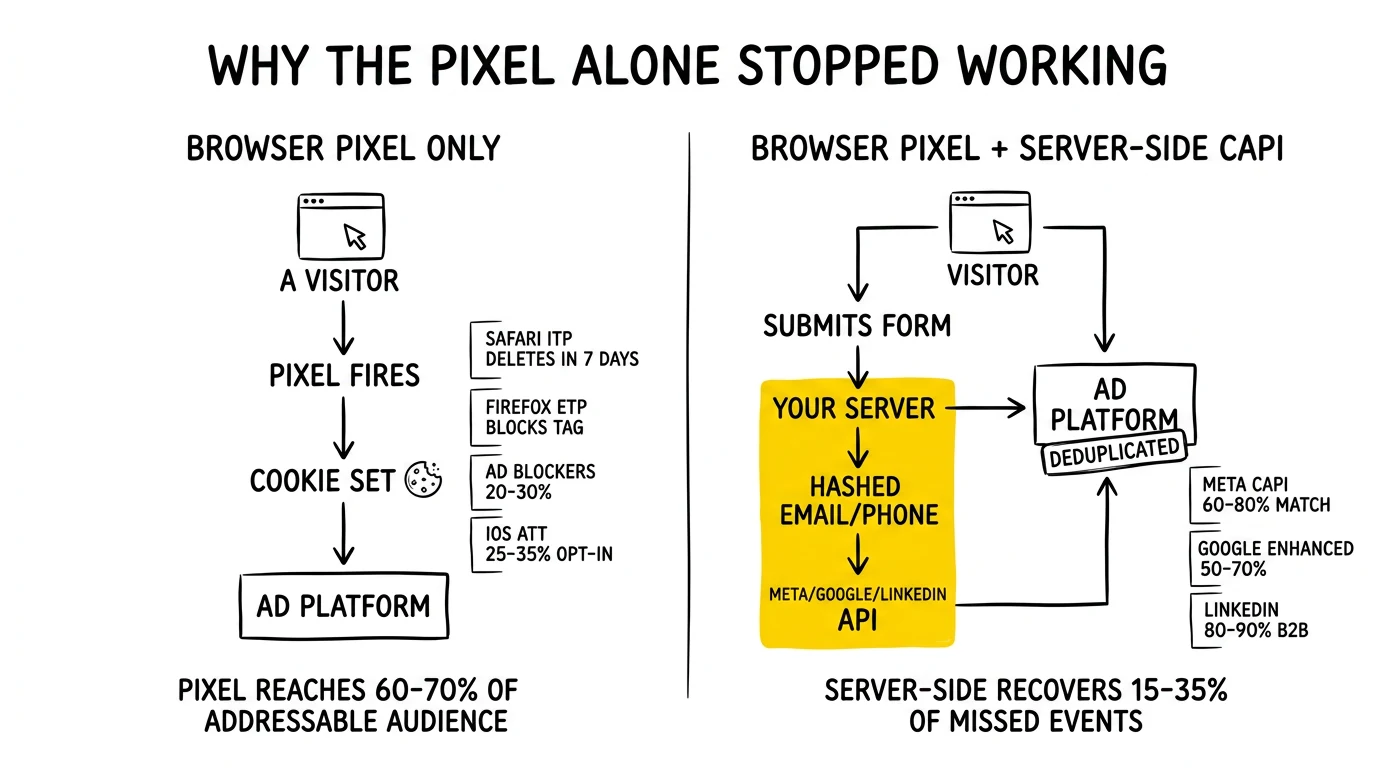
Safari’s Intelligent Tracking Prevention (ITP) deletes first-party cookies set by JavaScript after 7 days, eliminating the retargeting window for Safari users. ITP also downgrades third-party cookies to session-only duration, which breaks cross-site attribution. Safari represents approximately 19% of US desktop browser share and 27% of mobile.
Firefox Enhanced Tracking Protection blocks known tracker URLs by default, which includes the Facebook Pixel and many DSP tags. Firefox market share is smaller (3–5%) but non-trivial.
Browser extensions add further coverage gaps. uBlock Origin, AdBlock Plus, and Privacy Badger are installed on 20–30% of desktop browsers by various studies, though methodology varies significantly. Each blocks pixel-based tracking to varying degrees.
The practical result: pixel-only tracking reaches roughly 60–70% of the audience that would be addressable through a more complete implementation. The lost 30–40% skews toward privacy-conscious users, premium browsers, and browser extension users – audiences that are often more technically sophisticated and potentially higher quality for B2B lead programs.
Server-Side Event APIs
Server-side tracking bypasses browser-level blocking by moving event transmission to the server. When a visitor lands on your page, your server captures the visit and sends the event data directly to the advertising platform’s API, without involving the visitor’s browser for that data transmission.
Meta Conversions API (CAPI): When a visitor submits a lead form, your server sends the event to Meta’s /events endpoint with hashed contact data (email, phone, first name, last name) alongside the standard event parameters. Meta matches the hashed identifiers against its user graph. When a match occurs, the event records against that user’s profile rather than against a browser cookie. CAPI implementations consistently recover 15–35% of events that browser-only tracking misses.
Implementation requires server-side access to the event trigger (form submission, page visit), a server environment capable of making outbound API calls, and the hashed PII that enables user matching. Most lead generation platforms – boberdoo, LeadsPedia, LeadExec, landing page builders with server-side capabilities – can be configured to send CAPI events. Dedicated middleware like Stape or GTM Server-Side provides an alternative for operations without direct server access.
Google Enhanced Conversions: Google’s equivalent to CAPI sends hashed first-party data alongside standard conversion tags. When a visitor submits a form, their hashed email or phone is transmitted to Google alongside the conversion event. Google matches the hash against signed-in Google accounts. This improves conversion attribution accuracy and feeds audience-building signals that improve retargeting audience quality.
Enhanced Conversions for Web uses the Google tag or Tag Manager to collect and transmit the data. The implementation is simpler than CAPI – it can often run through Tag Manager rather than requiring server-side development – but produces material attribution improvements for operations with meaningful conversion volume.
LinkedIn Insight Tag and CAPI: LinkedIn’s Insight Tag captures page visits and sends data to LinkedIn’s servers for retargeting audience building and conversion attribution. LinkedIn’s server-side API (available through LinkedIn’s Conversions API, launched 2023) enables direct event transmission for conversions. The Insight Tag functions adequately for most retargeting purposes given LinkedIn’s user graph relies on deterministic login-based matching rather than cookies. CAPI becomes relevant for LinkedIn primarily when attribution accuracy matters more than audience building.
Signal Quality and Match Rates
The value of server-side tracking depends on match rates – the percentage of server-side events that successfully match to a platform user. Match rates vary by platform and by the quality of the first-party data transmitted.
Meta achieves 60–80% match rates for events with email and phone. Transmitting both email and phone improves match rates versus either alone. Adding first and last name alongside city and state further improves matching. For operations where consent permits the use of this data, transmitting the full complement of available identifiers maximizes match rates.
Google matches at 50–70% for Enhanced Conversions depending on the proportion of visitors logged into Google accounts during the session. This rate is naturally higher for Gmail-heavy audiences (common in B2B) and lower for consumer verticals where Google account login rates are more variable.
LinkedIn matches at 80–90% for business email addresses because its user graph is built on professional email authentication. This exceptional match rate makes LinkedIn’s Insight Tag one of the more reliable retargeting audience signals available despite LinkedIn’s smaller scale.
Audience Window Configuration
The window during which a visitor remains in a retargeting audience should reflect the purchase consideration cycle, not default platform settings. Default settings of 30 days for most platforms reflect a compromise position, not optimization for any specific vertical.
Window Duration by Vertical
Purchase consideration timelines differ across lead generation verticals. Retargeting windows should match the window during which the consumer is plausibly still evaluating.
Insurance (auto, home): Active shopping cycles run 1–2 weeks for most consumers. Beyond 2 weeks, a consumer who has not converted is likely either locked into another provider, has lost interest, or had their need resolved by another means. Target window: 14–21 days for standard retargeting; up to 30 days for high-consideration products like commercial insurance or life insurance.
Solar: Solar installation decisions typically span 30–90 days from initial inquiry to signed contract. Consumers research installers, compare financing options, wait for site assessments, and evaluate proposals before committing. A 60-day retargeting window is appropriate for most solar programs. Beyond 60 days, the lead is better served through email nurture than paid retargeting.
Mortgage: Rate shopping is time-sensitive – consumers often submit multiple applications within days of each other to compare offers. The active shopping window runs 7–21 days. Purchase mortgage leads have a longer consideration cycle than refinance leads; a purchase buyer may remain in market for months. Segment purchase and refinance audiences with different window configurations: 14 days for refinance, 30–45 days for purchase.
Legal (personal injury, mass tort): Consumers who have submitted a legal lead inquiry are often in immediate need. The window for active consideration is short – 5–14 days. Beyond two weeks, signed representation is either established or the consumer has stopped pursuing. Retarget aggressively within 7 days, then drop to suppression.
Home services: Needs-based triggers (broken HVAC, roof damage, plumbing failure) create immediate-intent leads with 3–7 day consideration windows. Project-based services (remodeling, landscape installation) have longer windows of 14–30 days. Configure window duration based on the specific service category.
B2B: Enterprise sales cycles can run 6–18 months. Retargeting windows of 60–90 days are appropriate for B2B platforms, particularly LinkedIn, where buying group members may return multiple times across a long evaluation period.
Recency Bidding
Within a retargeting window, recency correlates with intent. A visitor who was on your page 30 minutes ago is more likely to convert than one who visited 25 days ago. Most platforms support bid multipliers or audience segmentation by recency.
The practical approach: create separate audiences for recent visitors (0–3 days) and older visitors (4–30 days), then bid more aggressively on recent audiences. On Meta, this means creating two Custom Audiences with different window durations and running them in separate ad sets with different budgets. On Google, use bid adjustments within the campaign to increase bids for recent audiences. On LinkedIn, audience member recency is visible in campaign targeting but cannot be bid-adjusted directly – segment audiences instead.
Bid adjustment guidance by recency tier:
- 0–1 day: Bid at 120–150% of baseline
- 2–3 days: Bid at 100–120% of baseline
- 4–7 days: Bid at 80–100% of baseline
- 8–30 days: Bid at 60–80% of baseline
Exclusion Lists: Preventing Converted Visitor Targeting
Retargeting converted visitors with lead capture messaging is the most visible retargeting mistake and the easiest to prevent with proper exclusion configuration.
Exclusion Audience Architecture
Every retargeting campaign requires a corresponding exclusion audience that suppresses converted visitors. The exclusion audience is built from the same conversion event that defines success: if a lead submission fires a conversion event, that event defines the audience to exclude.
Platform-level exclusion setup:
Google: In audience manager, create an audience from users who triggered the lead conversion event. In every retargeting campaign, add this audience as a negative audience at the campaign or ad group level. Update the exclusion window to match your buyer’s re-submission policy – if a buyer accepts re-submissions after 60 days, set the exclusion to 60 days rather than the platform default.
Meta: Create a Custom Audience from website events selecting the lead event. In campaign setup under the Audience section, add this Custom Audience as an exclusion. Meta allows exclusion at the ad set level, which enables granular control: exclude converters from retargeting ad sets while allowing them to see different creative in brand awareness campaigns.
LinkedIn: Create a Matched Audience from the Lead Gen Form completion event or from website visitors who triggered the conversion event. In campaign setup, use the Audience section to add this as an exclusion. LinkedIn’s exclusion audiences update more slowly than Meta or Google – allow 24–48 hours for audience membership to propagate.
Real-Time vs. Batch Exclusion Updates
Platform-level exclusion audiences update periodically, not instantaneously. A visitor who submits a form at 2pm may remain in your retargeting audience until the next audience update cycle, potentially 6–12 hours later. During this window, they may see retargeting ads for a product they just purchased.
For high-value leads or high-volume operations, this gap matters. Server-side CAPI and Enhanced Conversions events update platform audiences faster than pixel-based events because they bypass browser transmission delays. Prioritizing server-side conversion event transmission reduces the window during which converted visitors see inappropriate retargeting.
For operations using Customer Match or LinkedIn Matched Audiences with uploaded list files, establish a minimum daily upload cadence for conversion suppression. Converters from the prior day should be added to suppression lists and uploaded before the next campaign day begins.
Segmented Exclusions for Multi-Product Operations
Operations with multiple products or verticals need segmented exclusion logic that reflects the consumer journey rather than a blanket converted/not-converted binary.
A consumer who converted for auto insurance should be excluded from auto insurance retargeting but may be a valid audience for home insurance upsell campaigns. A consumer who submitted a mortgage refinance lead in a high-rate environment may be a re-submission candidate six months later when rates change. A solar lead who was disqualified due to geography (renter, not homeowner) may become a valid target after the disqualification reason resolves.
Build exclusion audiences that match the specific product context, not just the general conversion event. This requires tagging conversion events with product-level identifiers that can be used to filter exclusion audience membership.
Frequency Capping: Platform Configuration and Thresholds
Frequency without control is the mechanism through which retargeting campaigns shift from persuasion to harassment. The research consensus on ad frequency and brand perception is clear: above certain thresholds, additional exposure reduces purchase intent rather than increasing it. The threshold varies by audience familiarity, creative quality, and product consideration cycle, but it exists for every retargeting context.
Platform-Specific Frequency Cap Configuration
Google Display Network:
Navigate to the campaign settings and locate the “Frequency management” section. Google offers automated frequency management (the platform optimizes based on expected conversion probability) or manual impression caps.
For retargeting campaigns, manual caps provide more predictable control. Set caps at the campaign level:
- Standard retargeting: 3–5 impressions per day, 10–15 per week
- High-intent abandoners (form starters): 5–7 impressions per day, 15–20 per week
- Post-rejection audiences: 2–3 impressions per day, 6–8 per week
Google’s frequency reporting is available in the campaign report view under the Audience tab. Export impression frequency reports weekly to identify audiences approaching saturation before response rates decline.
YouTube retargeting through Google operates on a separate frequency management interface in the campaign settings. YouTube frequency should be capped more aggressively than display: 2–3 views per day maximum, given the more intrusive nature of video ads.
Meta (Facebook and Instagram):
Meta does not offer direct frequency caps at the campaign level for most campaign objectives. Instead, it manages delivery through its automated auction system. However, several approaches provide effective frequency control:
Reach & Frequency buying: This buying type (available in campaign setup when “Reach” objective is selected) allows direct frequency cap configuration. For retargeting, set a maximum frequency of 2 per week for conservative control or 3 per week for audiences with high demonstrated intent.
Audience size management: Frequency is mathematically a function of budget, audience size, and reach. If budget is fixed and audience size is small (under 50,000), frequency will naturally run high. Widening retargeting audiences – by extending the membership window or adding related audiences – reduces natural frequency without requiring explicit caps.
Ad scheduling: Reduce impression delivery during hours when your audience is unlikely to convert (for B2B audiences, overnight and weekend delivery often produces low-quality engagement). This effectively reduces weekly impression total without formal frequency capping.
Fatigue detection: Monitor CTR weekly by audience. When CTR declines 20% or more week-over-week without creative rotation, frequency is the likely cause. This is Meta’s de facto frequency management signal.
LinkedIn:
LinkedIn offers impression frequency settings in the campaign settings under “Budget & Schedule.” Set maximum frequency from 1 to 4 impressions per day. For retargeting campaigns:
- Awareness and consideration objectives: 1–2 impressions per day
- High-intent audiences (demo request visitors, pricing page visitors): 2–3 impressions per day
LinkedIn’s audience is typically smaller than Meta or Google for most verticals. This makes frequency management particularly important – a small audience with a meaningful budget will naturally exhaust quickly if frequency is uncapped. Monitor audience size versus budget ratio before launch: campaigns reaching under 20,000 audience members need tighter frequency controls.
Frequency Decay and Window Management
Frequency caps should be implemented in conjunction with audience window management. Running a single retargeting campaign with a 30-day membership window and a 5-impressions-per-day cap may produce 150 impressions over the 30-day period – far beyond the point of diminishing returns.
Structure audience membership windows in descending intensity:
- Days 0–7: Active retargeting at standard frequency (5 impressions/day)
- Days 8–14: Reduced frequency (2–3 impressions/day), creative refresh
- Days 15–30: Suppressed or minimal retargeting (1 impression/day), brand awareness only
This requires creating separate audience lists (0–7 days, 8–14 days, 15–30 days) and configuring separate campaigns with appropriate frequency settings for each. The operational overhead is meaningful but prevents the audience fatigue that renders the 15–30 day window essentially wasted spend.
Cross-Platform Audience Synchronization
Running retargeting across Google, Meta, and LinkedIn simultaneously without coordination creates frequency management problems that no individual platform’s controls can solve. A visitor who sees 3 Google display ads, 3 Meta ads, and 2 LinkedIn ads in a single day has received 8 retargeting impressions – above the threshold where additional exposure becomes counterproductive, even though each individual platform is within its own cap.
The Cross-Platform Frequency Problem
Platform-level frequency caps control frequency within that platform. They have no visibility into impressions delivered on other platforms. A consumer experiencing Google, Meta, and LinkedIn retargeting simultaneously receives the sum of impressions from all three sources, which the consumer experiences as a unified (and potentially overwhelming) advertising pressure regardless of which platform each impression came from.
This problem becomes significant when retargeting budgets run above approximately $10,000/month on audiences under 100,000 people. At this concentration, cross-platform frequency regularly exceeds consumer tolerance thresholds.
Practical Cross-Platform Coordination Approaches
Budget-based frequency management: If cross-platform frequency is a concern but technical synchronization is not feasible, manage it through budget allocation. Keep retargeting budgets proportional to audience size across all platforms combined. A rule of thumb: retargeting budgets above $10 CPM-equivalent on an audience under 50,000 people create overexposure risk. Calculate budget limits before campaign launch based on expected reach.
Sequential retargeting by platform: Assign different platforms to different stages of the retargeting sequence. Google display handles the initial 0–7 day window. Meta handles days 8–14 with refreshed creative that builds on the earlier exposure. LinkedIn handles B2B audiences independently given its distinct context and user behavior. This approach reduces overlap while maintaining cross-channel presence.
First-party identity resolution: For operations with access to a customer data platform (CDP) or identity resolution tool, hashed email-based audience synchronization can coordinate audience membership and exclusion across platforms. When a user converts on any platform, their hashed email is added to suppression audiences across all platforms via Customer Match (Google), Custom Audiences file upload (Meta), and LinkedIn Matched Audiences. This requires a system that propagates conversion events to all platforms, either through a CDP or through custom event-passing infrastructure.
Deterministic versus probabilistic sync: Identity resolution works deterministically when the same email or phone appears across platforms. This requires the consumer to be logged in to platform accounts and those accounts to be associated with the contact identifiers you hold. For platforms like LinkedIn with professional email matching and Meta with personal email matching, overlap rates vary. Do not assume high cross-platform match rates without measuring them – actual overlap between platforms is typically 40–60% for consumer audiences, higher for professional B2B audiences with LinkedIn presence.
Audience Segmentation for Lead Generation Retargeting
The quality of retargeting outcomes depends significantly on audience segmentation. Treating all website visitors as a single retargeting pool ignores behavioral signals that predict conversion probability and messaging receptivity.
Segmentation by Behavioral Depth
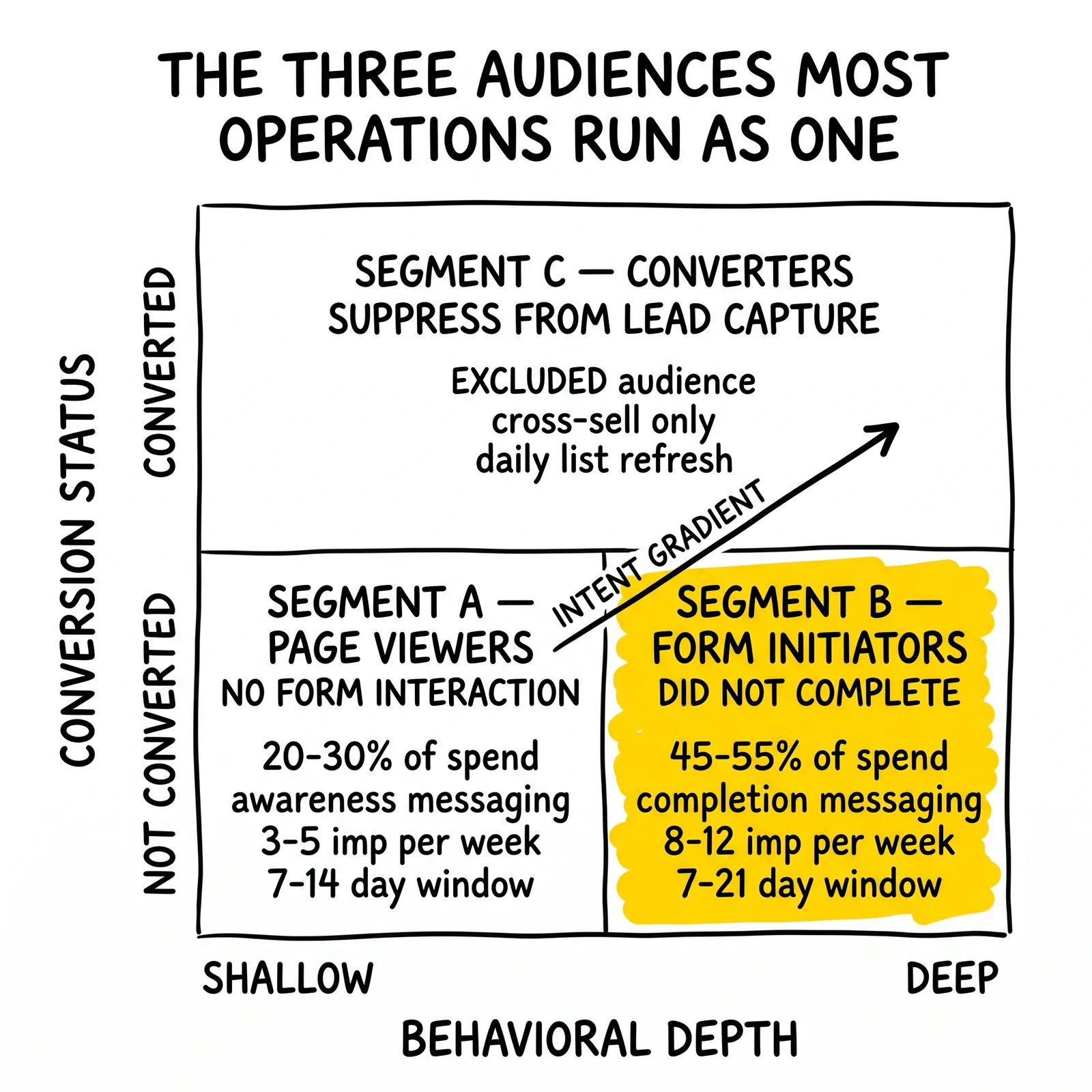
Segment A: Page visitors who did not interact with form elements
Audience definition: triggered page view event but did NOT trigger form_field_focus, form_start, or any form interaction event.
This segment represents the lowest intent tier within retargeting. They arrived at the page, consumed some amount of content, and left without initiating the conversion action. They may have been comparison shopping, arrived from an irrelevant search, or found the content informative without having purchase intent.
Targeting approach: awareness-oriented messaging focused on value proposition reinforcement, not conversion pressure. Budget allocation: 20–30% of retargeting spend. Frequency: conservative (3–5 impressions per week). Window: 7–14 days.
Segment B: Form initiators who did not complete
Audience definition: triggered form_start or form_field_focus event but did NOT trigger lead_submission or conversion event.
This segment demonstrated active intent – they initiated the commitment action and stopped. The decision to abandon may have been time pressure, friction in the form, uncertainty about information requirements, or comparison shopping that took them to a competitor form.
Targeting approach: completion-oriented messaging acknowledging they started, emphasizing simplicity and next steps. Budget allocation: 45–55% of retargeting spend. Frequency: higher tolerance (8–12 impressions per week). Window: 7–21 days.
Segment C: Converters excluded from lead capture retargeting
Audience definition: triggered lead_submission or conversion event.
This segment has already converted. They should NOT see lead capture retargeting. They should be excluded from Segments A and B campaign audiences and may receive cross-sell or nurture messaging through separate campaigns if your product set supports it.
Configuring Behavioral Audiences
Behavioral audiences require correct event configuration upstream. The segments above depend on firing distinct events at distinct funnel stages. If your tracking fires only a page view and a final conversion, you cannot build the “form initiator who did not complete” segment.
Google Tag Manager configuration for form interaction events:
Add a trigger based on “Element Visibility” to fire when the form container becomes visible in the viewport, and configure a custom event tag (“form_visible”) to send this to Google Analytics 4. Add a Click trigger with the condition that Click Element matches the form’s first input field, and configure a “form_field_focus” event tag. Add a Form Submission trigger scoped to the lead form, configured to send “lead_submission” when the form successfully submits.
These three events (form_visible, form_field_focus, lead_submission) create the audience segmentation foundation. In GA4 audiences (which feed Google Ads), build audiences using these event conditions with the appropriate exclusions between segments.
Meta Pixel event configuration:
The Meta Pixel tracks standard and custom events. Standard events include PageView, Lead, and CompleteRegistration. For form abandonment audiences, add custom events:
// Fire when form first field receives focus
fbq('trackCustom', 'FormFieldFocus', {
  form_name: 'lead_form',
  field: 'first_input'
});

// Fire on form submission
fbq('track', 'Lead', {
  content_name: 'lead_form_complete'
});
In Meta Ads Manager, create Custom Audiences using the “Website” source. For Segment B, select events that include FormFieldFocus but exclude Lead. For Segment C (exclusion audience), select events that include Lead.
Measuring Retargeting Performance Accurately
Attribution models systematically overstate retargeting value. Visitors who were already planning to return and convert appear in retargeting attribution as retargeting conversions, crediting the ad spend with outcomes that would have occurred anyway.
Holdout Testing Methodology
The only reliable way to measure retargeting’s true incremental value is randomized holdout testing.
Setup: Randomly split your retargeting audience – 90% receive ads, 10% receive no ads and serve as the control group. Both groups go through the same experience except for ad exposure. Run the test for a minimum of two weeks, long enough for conversion events to accumulate in both groups.
Measurement: Compare conversion rates between exposed and holdout groups. If the exposed group converts at 4.2% and the holdout converts at 3.1%, the incremental lift is 1.1 percentage points. Total conversions attributable to retargeting equal 1.1% of the retargeted audience, not the full 4.2%.
Platform holdout support:
- Meta: Brand Lift Study and Conversion Lift Study both support holdout group configuration. Access through Meta’s experiments tool.
- Google: Geo experiments and campaign-level experiments both support holdout testing, though the implementation differs.
- LinkedIn: A/B testing with audience splitting is available through Campaign Manager’s A/B Testing feature.
Interpreting results: Industry benchmarks suggest 30–60% of retargeting conversions are incremental. This means raw platform attribution overstates value by 40–150%. Adjust CPL calculations from retargeting accordingly: if reported CPL is $35 and incrementality is 50%, true incremental CPL is $70. At $70 true incremental CPL, the channel economics change significantly depending on vertical.
Metrics to Monitor Weekly
Audience size trend: Is the retargeting pool growing (more new visitors) or shrinking (conversion rate or traffic decline)? Shrinking audiences increase natural frequency even without budget changes.
Match rate (for Customer Match / CAPI audiences): Are uploaded lists matching at expected rates? Match rate below 50% indicates data quality issues in the list or mismatched identifier formats.
CTR by audience segment: Declining CTR week-over-week on a static audience indicates creative fatigue or frequency overexposure. Creative refresh should precede the decline, not follow it.
Frequency distribution: What percentage of audience receives 10+ impressions per week? Platforms provide impression frequency histograms. If more than 10% of the audience is receiving above-threshold impressions, frequency caps need tightening or audience pools need expansion.
Conversion rate by recency bucket: Do 0–3 day visitors convert at meaningfully higher rates than 4–7 day visitors? If yes, prioritize recent visitor audiences and reduce or eliminate the longer-window audience. If conversion rates are flat across the window, extend the window to maximize reach.
Frequently Asked Questions
How do I implement CAPI without a development team?
Third-party server-side tag management platforms – Stape, GTM Server-Side, and similar tools – provide CAPI implementation without custom server development. Stape offers a hosted server-side container that routes events to Meta’s CAPI endpoint without requiring server infrastructure. Setup involves configuring a GTM Server-Side container, adding the Meta CAPI client template, and connecting your existing website events. Cost is approximately $40–200 per month depending on event volume.
What is the correct audience window for a B2B retargeting campaign on LinkedIn?
60–90 days. B2B buying decisions involve multiple stakeholders, extended evaluation periods, and budget approval cycles that routinely exceed 30-day windows. Visitors who viewed a product page, case study, or pricing page but did not convert may re-engage weeks or months later as the buying process moves through internal approval stages. Cap frequency at 1–2 impressions per day given LinkedIn’s typically smaller audience pools.
How should I handle retargeting for verticals with TCPA compliance requirements?
TCPA requirements govern outbound calling and texting, not display advertising. Retargeting pixels and cookie-based audience building do not trigger TCPA consent requirements. However, for operations using Custom Audiences or Customer Match built from lead submission data, ensure that the original consent captured at form submission permitted use of contact data for marketing purposes. If consent language was limited to contact for quote purposes, using the contact data to build retargeting audiences may require additional consent. Review with compliance counsel.
My Meta retargeting audience shows 50,000 people but my conversion volume is low. What is wrong?
Audience size and conversion potential are not linearly related. Likely causes: the audience includes low-intent visitors who bounced quickly and have already converted elsewhere; the creative is not differentiated from cold traffic and fails to capture the “we already connected” dynamic that makes retargeting effective; or frequency is too low, meaning each person in the 50,000 sees the ad once every two weeks rather than multiple times. Check impression frequency, review creative messaging for retargeting relevance, and audit audience composition against behavioral segment definitions.
Can I retarget across devices if I only have pixel-based tracking?
Pixel-based tracking is device-specific – a cookie set in a mobile browser does not follow the user to desktop. Cross-device retargeting requires deterministic identity resolution: the user must log into the same account on both devices, allowing the platform to link the devices. For platforms where users are frequently logged in (Google, Meta, LinkedIn), deterministic cross-device matching is available at high rates. For DSPs and programmatic contexts, probabilistic cross-device matching exists but is less reliable. For operations where cross-device reach matters, Customer Match / Custom Audiences built from email and phone identifiers provide deterministic cross-device matching regardless of browser tracking.
How often should I refresh retargeting creative?
Every 2–3 weeks for high-frequency audiences, every 3–4 weeks for moderate-frequency audiences. The signal that refresh is overdue: CTR declining more than 20% week-over-week without other explanation. Do not wait for CTR to decline before rotating creative; refresh on a scheduled cadence and monitor whether the rotation maintains or improves CTR. For form-abandonment audiences (Segment B), creative that directly references the incomplete form step outperforms generic retargeting creative significantly – personalize where possible.
Key Takeaways
Server-side tracking is not optional. Pixel-only tracking misses 30–40% of retargeting audience members due to browser-level privacy features. CAPI and Enhanced Conversions implementations recover a meaningful portion of that gap and improve the signal quality that feeds audience optimization.
Audience windows should match purchase cycles, not platform defaults. 30-day windows are wrong for most verticals in both directions – too short for solar and B2B, too long for home services and urgency-driven legal needs. Configure window duration based on actual consideration cycle data from your vertical.
Exclusion audiences are as important as targeting audiences. Showing lead capture ads to yesterday’s converters wastes impressions and creates brand friction. Configure exclusion audiences from conversion events and update them daily at minimum, in real-time if server-side implementation permits.
Frequency caps must be configured explicitly. Platform defaults allow frequency accumulation that exceeds consumer tolerance thresholds within days for small audiences and standard budgets. Set platform-level frequency caps and monitor frequency distribution weekly.
Cross-platform frequency is a real problem at scale. Individual platform frequency caps do not account for impressions received on other platforms. Manage cross-platform frequency through budget controls, sequential audience assignment by platform, or first-party identity synchronization.
Behavioral segmentation improves retargeting efficiency substantially. Visitors who initiated form completion are higher intent than page visitors who bounced. Build separate audience segments with different budget allocations, creative messaging, and frequency configurations based on behavioral depth.
Holdout testing reveals true incremental value. Platform attribution overstates retargeting contribution by 40–150% because it credits conversions that would have occurred without ad exposure. Run holdout tests quarterly to calibrate actual incremental CPL.
Sources
- Meta Conversions API Documentation – Implementation guide for server-side event transmission including event deduplication and user data hashing requirements
- Google Enhanced Conversions – Google’s first-party data matching for conversion measurement, including Tag Manager implementation instructions
- LinkedIn Conversions API – LinkedIn’s server-side event API for conversion tracking and audience building
- Stape Server-Side GTM – Third-party hosted server-side tagging platform with Meta CAPI and Google Enhanced Conversions integrations
- Meta Ads Learning Phase – Official documentation on audience optimization thresholds for ad set delivery
Platform capabilities, privacy settings, and tracking options change frequently. Verify current implementation requirements against official platform documentation before technical deployment. Audience size minimums and frequency cap configurations reflect platform policies as of early 2026.