
Most SEO guidance treats lead generation sites like blogs or e-commerce stores. The advice is not wrong, exactly – it just ignores the specific technical problems that arise when a site’s primary purpose is lead capture. Lead generation sites have structural characteristics that create SEO complications that other site types do not face: high page counts from geographic targeting, conversion optimization elements that conflict with page speed, duplicate content from similar service offerings, and schema requirements that differ from standard business types.
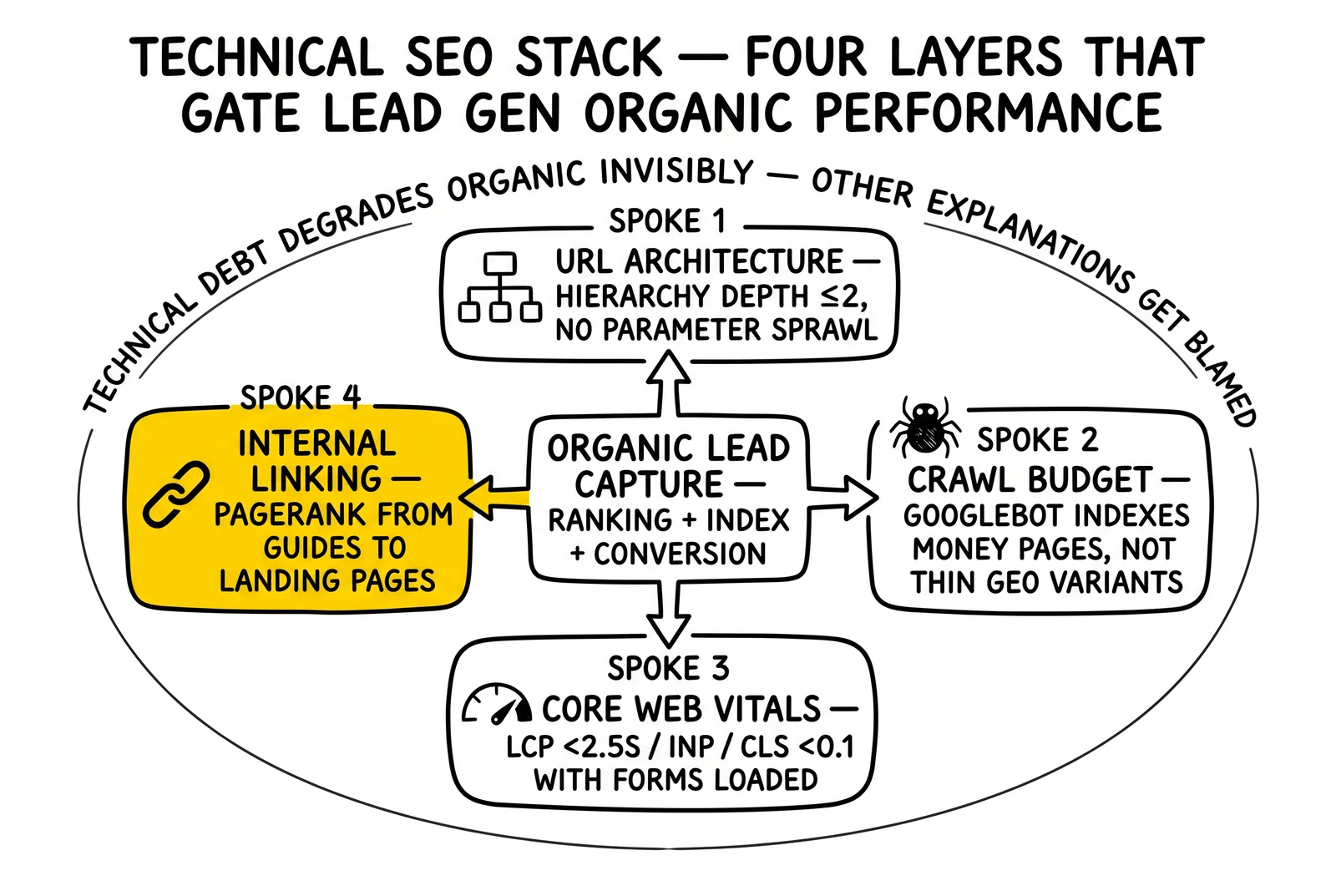
The technical SEO layer determines whether content and link-building investments produce results. Sites with weak technical foundations rank poorly regardless of content quality or link profile. For lead generation operations managing dozens of verticals, hundreds of location pages, and multiple traffic acquisition channels, technical debt accumulates invisibly – degrading organic performance while other explanations get blamed.
This analysis covers the technical SEO specifics relevant to lead generation operations: URL architecture decisions, crawl budget allocation across large page sets, Core Web Vitals optimization when conversion elements compete with speed, schema markup implementation for lead capture contexts, and the internal linking architecture that routes PageRank toward money pages.
URL Structure for Lead Generation Sites
URL architecture decisions made during site launch create lasting consequences. Changing URL structures later requires redirects that lose some link equity, URL reconsideration that can drop rankings temporarily, and the operational overhead of updating internal links across hundreds of pages. Getting the structure right initially matters more for lead generation sites than most.
The Fundamental Architecture Decision
Lead generation sites face a choice between flat and hierarchical URL structures that reflects a real tension in how Google evaluates page authority.
Flat structures keep all pages close to the root domain:
/auto-insurance-quotes/
/auto-insurance-texas/
/auto-insurance-california/
/auto-insurance-florida/
Hierarchical structures group related pages under parent URLs:
/auto-insurance/
/auto-insurance/texas/
/auto-insurance/california/
/auto-insurance/florida/
Hierarchical structures communicate topical organization to search engines. Google uses URL path depth as one signal for understanding site architecture. Pages nested under a relevant parent directory inherit contextual relevance. The parent URL also becomes indexable, giving you an additional ranking opportunity for the root category term.
The practical recommendation for lead generation sites: use one level of hierarchy for the primary categorization (service type or vertical), then flat within that category. Going deeper than two levels – /insurance/auto/texas/dallas/quotes/ – creates URL path depth that dilutes relevance signals and complicates crawl efficiency.
Geographic Targeting in URL Structure
Location-specific pages represent the highest-volume technical SEO challenge for lead generation sites. A service operating in 50 states with 10 major metro areas each produces 500+ location pages before adding service variations.
Several URL patterns work for geographic targeting:
| Pattern | Example | Best For |
|---|---|---|
| /service/state/ | /roofing-leads/texas/ | State-level targeting, smaller sites |
| /service/city/ | /roofing-leads/dallas/ | Metro targeting, urban-focused services |
| /state/service/ | /texas/roofing-leads/ | State-first hierarchy |
| /city-service/ | /dallas-roofing-leads/ | Flat structure with geo-modifier |
The flat geo-modifier pattern (/dallas-roofing-leads/) loses hierarchical authority benefits but performs well for local intent queries and avoids crawl depth issues. The hierarchical pattern (/roofing-leads/texas/dallas/) builds topical authority chains but requires more crawl budget and creates deeper page paths.
What to avoid:
- URL parameters for geographic filtering:
/roofing-leads/?state=texas&city=dallas– parameters create crawl budget waste and canonicalization problems - Inconsistent patterns across service types – mixing flat and hierarchical structures across the same site creates confusing site architecture signals
- Excessive depth: anything beyond three directory levels loses its audience to bounce and creates crawl budget problems
URL Parameters and Crawl Contamination
Lead generation sites frequently create URL parameter problems through:
- Tracking parameters appended to landing page URLs (
?utm_source=google&utm_campaign=roofing) - Form state parameters from multi-step forms that create new URLs at each step
- Filter parameters from quote comparison tools or product configurators
- Session identifiers from CRM integrations or A/B testing tools
Each unique parameter combination creates what Googlebot treats as a new URL. A landing page that receives traffic from 20 different UTM parameter combinations appears to Google as 20 separate pages – each competing with the others and splitting crawl budget across duplicate content.
Fixes:
Google Search Console’s URL Parameters tool (legacy) and the newer approach through robots.txt and canonical tags address parameter contamination. The preferred solution is canonicalization: add <link rel="canonical" href="https://example.com/auto-insurance-quotes/" /> to parameterized versions pointing to the clean URL. This signals to Google that all parameter variants are equivalent to the canonical URL.
For tracking parameters specifically, configure Google Analytics 4 and your ad platforms to use server-side tracking or to strip UTM parameters before they hit the browser URL bar. GA4’s Measurement Protocol enables tracking without parameter-contaminated URLs.
Crawl Budget Management for Large Lead Gen Sites
Crawl budget refers to the number of URLs Googlebot will crawl on a site within a given timeframe. This is not a hard limit – Google’s crawl systems are adaptive – but for large lead generation sites, crawl efficiency directly affects how quickly new pages get indexed and how often existing pages get re-evaluated for ranking updates.
How Google Allocates Crawl Budget
Google determines crawl budget based on two factors: crawl rate limit (how fast the server can handle requests without degradation) and crawl demand (how popular and fresh the pages appear to be).
Sites with high crawl demand – many external links, frequent content changes, strong ranking history – receive more crawl budget. Sites that return slow responses or error pages have their crawl budget reduced automatically to avoid server overload.
For lead generation sites with 100+ pages, the relevant question is: how many of those pages should actually be indexed?
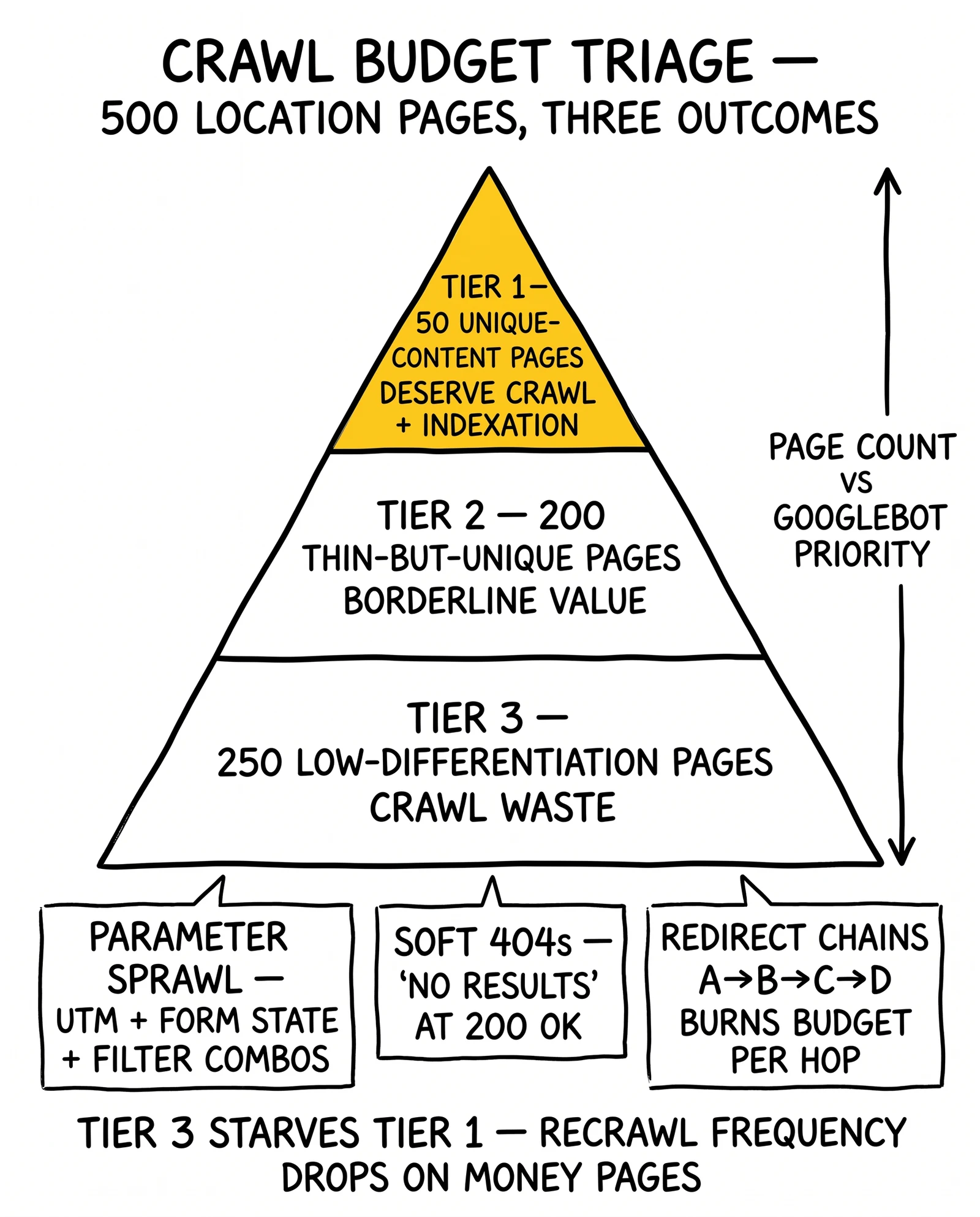
The answer is often fewer than operators assume. A lead generation site with 500 location pages might have:
- 50 pages with unique content and traffic potential: deserve crawl and indexation
- 200 pages with thin but unique content: borderline value
- 250 pages with minimal differentiation from parent pages: crawl waste
Googlebot spending budget on the 250 low-value pages reduces how often the 50 high-value pages get recrawled and updated in the index.
Identifying Crawl Budget Waste
Run a full site crawl using Screaming Frog, Sitebulb, or a comparable tool to identify crawl budget waste sources:
Orphaned pages: Pages with no internal links from other pages. Googlebot reaches these only through sitemaps or external links. If a page exists but no internal link points to it, Googlebot treats it as low priority.
Redirect chains: Redirects that chain through multiple hops (A → B → C → D) consume crawl budget at each hop. Each redirect in a chain means Googlebot has to make multiple requests to reach the final content. Consolidate redirect chains to single hops.
Soft 404s: Pages that return 200 OK status codes but display “no results,” “content not found,” or similar empty states. These pages consume crawl budget without contributing value. Return 404 status codes for genuinely missing content, or redirect to the most relevant live page.
Pagination crawl waste: Lead generation sites with paginated lists of results (lead marketplaces, comparison sites) can generate thousands of paginated URLs. Implement rel="noindex" on paginated pages beyond page two or three for categories without meaningful unique content on each page, or use Google’s handling preferences for paginated series.
Parameter sprawl: As described above – UTM parameters, session IDs, and filter parameters that create duplicate URL spaces.
robots.txt Configuration for Lead Gen Sites
robots.txt controls which URLs Googlebot is allowed to crawl (though not whether they get indexed – that requires noindex tags). For lead generation sites, robots.txt should block:
- Admin and login pages
- Thank-you pages after form submission (these reveal conversion tracking data and provide no organic value)
- CRM integration endpoints
- Testing and staging URL patterns
- Internal search result pages (unless they have genuine SEO value)
Example configuration:
User-agent: Googlebot
Disallow: /thank-you/
Disallow: /admin/
Disallow: /login/
Disallow: /crm-sync/
Disallow: /test-*
Disallow: /stage-*
Allow: /
Do not block CSS and JavaScript files. Googlebot needs to render pages to evaluate them, and blocking rendering resources degrades quality assessment.
XML Sitemap Strategy for Priority Signaling
XML sitemaps do not directly improve rankings, but they signal to Google which pages you consider important. For large lead generation sites, sitemap strategy matters.
Separate sitemaps by page type:
/sitemap-landing-pages.xml– money pages, geographic landing pages/sitemap-content.xml– guides, comparison content, informational articles/sitemap-location.xml– location-specific pages
This separation allows monitoring indexation rates by page type in Google Search Console. If location pages show low indexation rates while content pages index normally, you have identified a specific crawl priority issue.
Only include pages in sitemaps that you want indexed. Including low-quality pages in sitemaps trains Google to evaluate those pages, which can lower the perceived quality of the domain. Exclude:
- Thin pages with fewer than 300 unique words
- Pages duplicated across geographic variants without meaningful differentiation
- Pages receiving no traffic after 90+ days of indexation
Update sitemap lastmod dates accurately. The <lastmod> tag tells Google when content was last updated. Only change this date when content actually changes. Sites that set lastmod to the current date on every crawl – a common CMS behavior – lose the signal value of the tag.
Core Web Vitals Optimization for Lead Capture
Core Web Vitals are Google’s page experience metrics, used as ranking signals since 2021. For lead generation sites, these metrics create a specific optimization conflict: the elements that improve conversion rates (forms, tracking pixels, live chat, dynamic pricing) often degrade the Core Web Vitals scores that affect rankings.
Resolving this conflict requires understanding which performance problems have the highest SEO impact, and which conversion elements cause the most damage.
Largest Contentful Paint (LCP): The Lead Gen Problem
LCP measures how long it takes for the largest visible element to render. For lead generation landing pages, the LCP element is typically a hero image, a headline, or the primary form.
Common LCP issues on lead generation sites:
Hero images loaded without priority: Most pages include a large hero image above the fold. If this image loads with standard lazy loading, or if it is not preloaded, LCP suffers. Add fetchpriority="high" attribute to the hero image element.
Form rendering blocked by JavaScript: Forms that require JavaScript to render – common with form builder tools like Gravity Forms, Typeform embeds, or CRM-integrated forms – delay LCP because the JavaScript must load and execute before the form appears. Consider server-side rendered forms for landing pages where LCP matters.
Third-party scripts blocking render: Analytics tags, ad pixels, and CRM connection scripts that load synchronously block page rendering. Load all non-critical third-party scripts with defer or async attributes. Better: consolidate through Google Tag Manager and configure tag firing order so non-critical tags fire after page load.
Target LCP under 2.5 seconds. For lead generation, measuring LCP from real-user data (Google Search Console’s Core Web Vitals report, or Chrome UX Report data) matters more than lab measurements from Lighthouse, because real users on varied connections see different results than controlled test environments.
First Input Delay / Interaction to Next Paint (INP)
FID measured the delay between a user’s first interaction and the browser’s response. Google replaced FID with Interaction to Next Paint (INP) in March 2024. INP measures the latency of all interactions throughout the page session, not just the first one.
For lead generation sites, the highest-INP interactions are typically:
- Clicking “Get Quote” or “Submit” buttons on forms
- Selecting options in multi-step form flows
- Interacting with comparison tools or calculators
Poor INP on these interactions directly hurts conversion rates before it hurts rankings – users who experience sluggish form responses abandon the form. The SEO and CRO optimization objectives align here.
Common INP causes on lead gen sites:
- Long-running JavaScript on form submit events (validation, CRM posting, tracking event firing)
- Blocking event listeners that prevent user interaction during background tasks
- Heavy recalculations triggered by form field changes in dynamic multi-step forms
Fixes:
- Move form submission processing to service workers or background threads where possible
- Implement validation feedback without blocking the main thread
- Profile long tasks using Chrome DevTools Performance panel to identify specific blocking operations
Cumulative Layout Shift (CLS): Form Stability Under Load
CLS measures visual instability – content that moves while the page loads. For lead generation pages, CLS most commonly affects:
Above-fold form layout shifts: Forms that load after surrounding content push text down when they appear. Reserve explicit height in the DOM for form elements before they render: min-height: 400px on the form container prevents layout shift when the form loads.
Late-loading trust signals: Customer review badges, certification logos, and partner icons that load after page paint cause layout shifts. Use explicit dimensions on all image elements and load trust signals synchronously.
Chat widget insertion: Live chat tools (Intercom, Drift, HubSpot Chat) typically inject DOM elements after page load, pushing content up or adding floating elements that cause layout recalculation. Place chat widget containers in the DOM with explicit reserved space, or load the chat widget only after user interaction.
Dynamic content from lead distribution APIs: Pages that display real-time offers, available providers, or dynamic pricing often inject content after initial page paint. Reserve space in the layout for dynamic content areas, and use skeleton screens while API responses load.
Target CLS below 0.1. Google measures CLS using the 75th percentile of real users on that page.
Page Speed Beyond Core Web Vitals
Core Web Vitals measure specific aspects of load experience. Overall page speed affects conversion rates through mechanisms independent of CWV scores.
Time to First Byte (TTFB): How quickly the server returns the first byte of content. For lead generation sites using dynamic landing pages (personalized by geography, traffic source, or prior behavior), TTFB reflects server-side processing time. Target TTFB under 800ms. Use CDN caching for static elements; optimize server-side rendering time for dynamic components.
Critical rendering path: The sequence of resources the browser must load before displaying anything. Minimize render-blocking resources by:
- Inlining critical CSS for above-fold content
- Deferring non-critical CSS with
<link rel="preload"> - Eliminating render-blocking JavaScript from the head
Resource loading order: Use browser hints to prioritize critical resources:
<link rel="preload" href="/fonts/primary.woff2" as="font" crossorigin>
<link rel="preload" href="/images/hero.webp" as="image" fetchpriority="high">
<link rel="dns-prefetch" href="//api.leadvendor.com">
These hints tell the browser which resources to fetch immediately, before the parser discovers them in the page content.
Schema Markup for Lead Generation Pages
Schema markup (structured data) communicates page content to search engines in machine-readable format. For lead generation sites, schema serves two purposes: improving search appearance through rich results, and helping search engines understand page purpose and entity relationships.
Which Schema Types Apply to Lead Generation
Different page types require different schema implementations:
LocalBusiness (or vertical-specific subtypes)
For location-specific lead generation pages, LocalBusiness schema signals geographic relevance for local pack eligibility. Use the most specific subtype available: InsuranceAgency, LegalService, MortgageLoan, HomeAndConstructionBusiness – not the generic LocalBusiness.
Required properties for local pack consideration:
name: Business nameaddress: Full postal addresstelephone: Primary contact numberurl: Canonical URL for this locationareaServed: Geographic service area
Service For service-description pages, Service schema communicates what is offered:
{
  "@context": "https://schema.org",
  "@type": "Service",
  "name": "Auto Insurance Quotes",
  "serviceType": "Insurance",
  "provider": {
    "@type": "InsuranceAgency",
    "name": "QuoteCompare"
  },
  "areaServed": {
    "@type": "State",
    "name": "Texas"
  }
}
FAQPage FAQ schema generates FAQ accordion rich results in Google Search, displaying question-answer pairs directly in search results. This increases SERP real estate and click-through rate for pages where FAQ accordions appear.
Implement only for pages with genuine FAQ sections. Google’s quality reviewers penalize pages that implement FAQ schema on low-value questions used primarily for SERP manipulation.
HowTo For process-explanation content – “how to compare auto insurance quotes,” “how to apply for a mortgage” – HowTo schema enables step-based rich results showing numbered steps in search.
Review / AggregateRating For pages featuring customer testimonials or aggregate review data, Review and AggregateRating schema can display star ratings in search results. This is heavily monitored for abuse – only implement for genuine review data with a legitimate review methodology.
Schema for Lead Forms Specifically
No dedicated schema type exists for lead capture forms, but several schema patterns communicate form purpose:
Action schemas can indicate what action a form enables:
{
  "@context": "https://schema.org",
  "@type": "WebPage",
  "potentialAction": {
    "@type": "SearchAction",
    "target": "https://example.com/search?q={search_term}",
    "query-input": "required name=search_term"
  }
}
For comparison platforms, SearchAction communicates that the page facilitates searching a product category. This is most relevant for insurance comparison platforms, mortgage rate comparison tools, and similar lead generation models built around comparison functionality.
BreadcrumbList schema communicates page hierarchy, helping search engines understand where a page sits within the site structure:
{
  "@context": "https://schema.org",
  "@type": "BreadcrumbList",
  "itemListElement": [
    {"@type": "ListItem", "position": 1, "name": "Insurance", "item": "https://example.com/insurance/"},
    {"@type": "ListItem", "position": 2, "name": "Auto Insurance", "item": "https://example.com/insurance/auto/"},
    {"@type": "ListItem", "position": 3, "name": "Texas", "item": "https://example.com/insurance/auto/texas/"}
  ]
}
BreadcrumbList also generates breadcrumb displays in search results, which can improve click-through rates by making the site hierarchy visible.
Schema Validation and Testing
Test schema implementations before deployment using:
- Google’s Rich Results Test: Validates schema and previews how rich results would appear
- Schema.org Validator: Checks schema against the schema.org specification
- Google Search Console Rich Results report: Shows which pages have valid schema and any errors discovered during crawling
Common schema errors on lead generation sites:
- Missing required properties (often
telephoneon LocalBusiness) - Inconsistent entity names between schema and on-page content
- Implementing schema on pages without the corresponding on-page content (FAQ schema with no visible FAQs)
- Incorrect geographic scope (country-level areaServed on city-specific pages)
Internal Linking Architecture for Lead Generation
Internal linking distributes PageRank (Google’s measure of page authority based on links) through the site. Pages that receive more internal links – particularly from high-authority pages – rank more easily for their target keywords. For lead generation sites, the strategic objective is routing PageRank from authority-building content toward money pages.
The PageRank Flow Problem
Most lead generation sites have an authority distribution problem: the pages that earn external links (guides, comparisons, research content) are not the pages that generate leads (landing pages, quote forms). PageRank pools in content pages and does not flow efficiently to conversion pages.
Visualizing the problem:
Homepage (high authority)
    → About Page (few links out)
    → Blog (moderate authority)
        → Guide 1 (link earner, high authority)
        → Guide 2 (link earner, high authority)
        → Guide 3 (link earner, moderate authority)
    → Quote Landing Pages (low authority, high conversion value)
The guide pages earn external links but do not link to the quote landing pages. PageRank earned by guides stays in the content section rather than flowing to conversion pages.
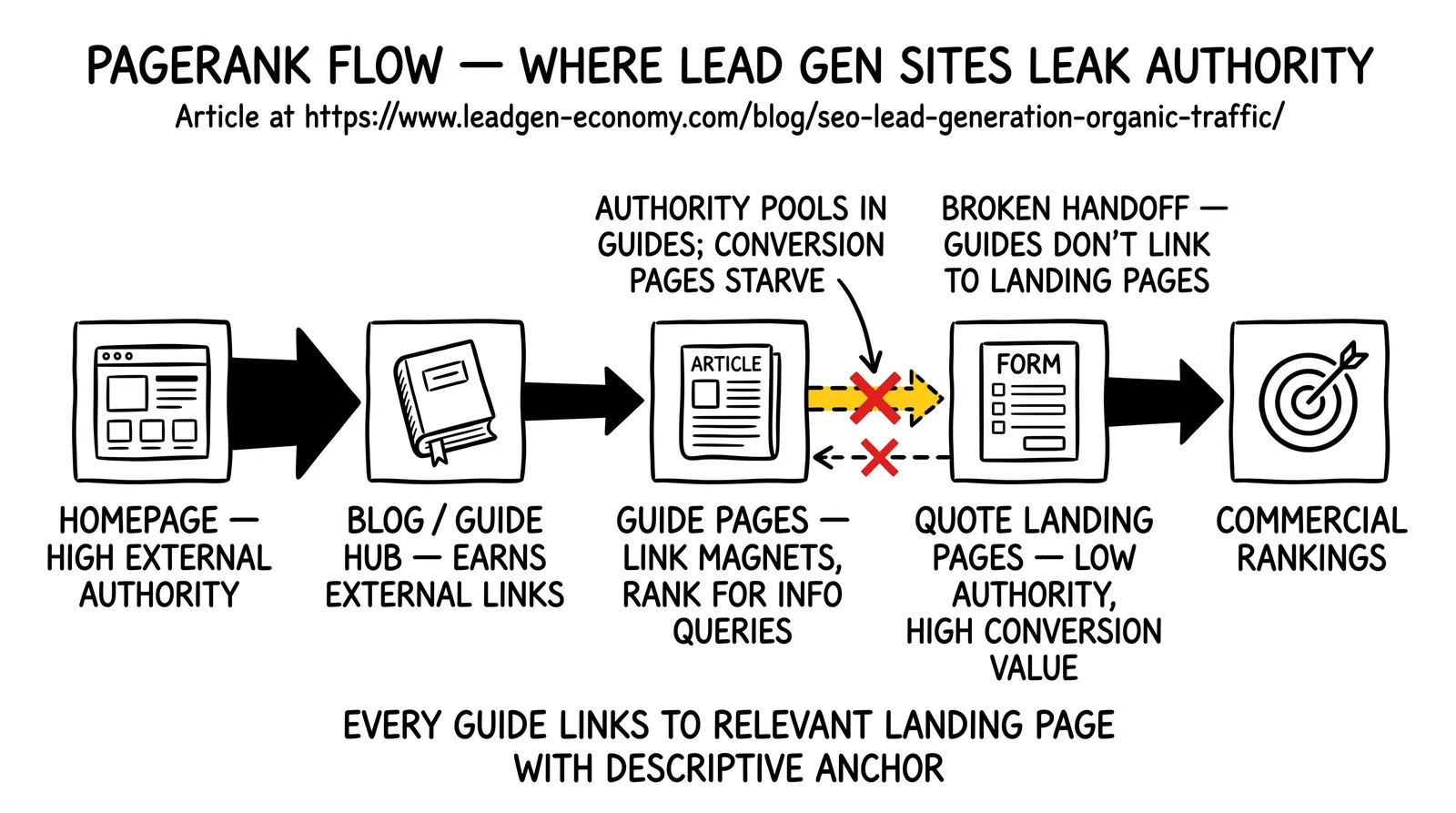
The fix is systematic internal linking from content to commercial pages:
Every guide, comparison, and informational article should link to the relevant lead capture landing page. This is both good UX (users who finish reading about insurance should be able to get a quote) and good SEO (it routes PageRank toward the pages that need authority to rank).
Silo Architecture vs. Flat Linking
Two primary internal linking architectures exist for lead generation sites:
Silo architecture groups related pages and restricts internal links to stay within the silo. An insurance silo would contain all insurance pages, and internal links would only connect insurance pages to other insurance pages.
The benefit: strong topical relevance signals for each silo. Search engines see a cluster of pages intensely focused on a topic.
The drawback: PageRank cannot flow between silos. Authority earned by the auto insurance silo does not help the home insurance silo.
Hub-and-spoke architecture designates hub pages that link to all pages within a topic, and spoke pages that link back to the hub and to closely related spokes.
The benefit: PageRank flows more freely, benefiting all pages in the network.
The drawback: Less concentrated topical relevance signal compared to strict silos.
Most lead generation sites benefit from a hybrid: loose silos that maintain topical groupings but allow cross-silo links for genuinely related content. An auto insurance page might link to a home insurance bundle offer – maintaining topical relationships while allowing cross-silo authority flow.
Anchor Text Strategy
Anchor text (the clickable text of a link) communicates context to search engines about the linked page’s content. For lead generation sites:
Use descriptive, keyword-relevant anchor text for important internal links:
- “auto insurance quotes in Texas” links to the Texas auto insurance page
- “mortgage pre-approval process” links to the mortgage pre-approval guide
- “compare roofing contractors” links to the roofing comparison landing page
Avoid over-optimization: Using the exact target keyword as anchor text on every internal link creates patterns that can appear manipulative. Vary anchor text naturally: use the exact keyword sometimes, synonyms sometimes, partial phrases other times.
Avoid generic anchor text for strategic links: “click here,” “read more,” and “learn more” provide no context to search engines. Reserve generic anchors for navigational elements; use descriptive anchors for editorially placed links.
Identifying Internal Linking Gaps
Run a site crawl to find pages with few internal links pointing to them (orphaned or near-orphaned pages). Filter your money pages – the landing pages that should rank for commercial keywords – and check how many internal links point to each.
Pages with high conversion potential but few internal links should receive immediate attention. Add links from:
- Related content pages that discuss the same service
- The homepage, if the service is a primary offering
- Sidebar or footer navigation elements
- Hub pages for the relevant service category
Track internal link counts over time using crawl tools. Declining internal link counts for important pages – which can happen when site redesigns or CMS migrations break links – should trigger immediate correction.
Monitoring Technical SEO Health
Technical SEO is not a one-time implementation. Sites degrade as content is added, systems integrate, and platform changes introduce new technical issues.
Google Search Console as Primary Signal Source
Google Search Console’s Core Web Vitals report shows real-user data from Chrome users visiting the site. This data differs from Lighthouse measurements and is what Google actually uses for ranking. Pages flagged as “Poor” or “Needs Improvement” in Search Console should be prioritized for optimization.
The Coverage report identifies indexation issues: pages excluded from the index, pages with errors preventing indexation, and pages indexed despite noindex directives. For lead generation sites, coverage monitoring catches:
- Location pages that failed to index after creation
- Landing pages accidentally set to noindex
- Soft 404s consuming crawl budget
The Search Appearance report shows which schema types are generating rich results and any errors preventing rich result eligibility.
Crawl Monitoring Tools
Supplement Google Search Console with regular crawls using tools like:
- Screaming Frog: Desktop crawl tool for detailed link analysis, redirect audit, and page data extraction
- Sitebulb: Visual crawl tool with prioritized issue reporting useful for large sites
- Ahrefs Site Audit: Cloud-based auditing with historical comparison
Monthly crawls for sites under 1,000 pages; weekly crawls for larger sites or sites with frequent content updates. Compare crawl results over time to identify new technical issues introduced by content updates or platform changes.
PageSpeed Insights and Core Web Vitals Field Data
Google’s PageSpeed Insights tool combines Lighthouse lab measurements with Chrome UX Report field data for individual URLs. Run monthly checks on primary landing pages and compare trends. A CWV score that was “Good” in a previous check but now shows “Needs Improvement” indicates a degradation introduced by recent changes.
For large sites, automated CWV monitoring using tools that check a representative page sample (not just the homepage) provides broader coverage. Many lead generation sites have excellent homepage performance but poor performance on deeply nested landing pages that receive less optimization attention.
FAQ
How many location pages are too many for crawl budget?
There is no universal threshold, but a practical test is indexation rate. If you create 500 location pages and only 200 get indexed within 90 days despite being in your sitemap, Google is signaling that many of your location pages do not meet its quality threshold for indexation. Reduce page count by merging thin location pages, increase quality by adding genuinely unique content to each page, or both.
Should lead generation forms be server-side rendered or JavaScript-rendered?
Server-side rendered forms load faster and ensure the form is visible even if JavaScript fails. JavaScript-rendered forms from form builder tools (Gravity Forms, Typeform, HubSpot Forms) may delay LCP and create INP issues when form logic is complex. For primary landing pages where SEO and conversion rates matter most, server-side rendering is preferable. For secondary or supplemental forms, the trade-off may favor builder tool convenience.
Does page speed matter more for SEO or for conversion rates?
For lead generation, conversion rate impact typically exceeds SEO ranking impact for page speed improvements. A page that loads in 1 second versus 4 seconds sees conversion rate differences of 20-30% in real-world tests, which dwarfs the ranking lift from improved Core Web Vitals scores. This means page speed optimization is worth prioritizing even if the primary motivation is revenue rather than rankings.
How should canonical tags be implemented across similar location pages?
Each location page should canonicalize to itself if it has genuinely unique content. If location pages share identical content with only the location name changed, canonicalize all variants to the most authoritative version (usually the state-level or primary metro page). This prevents Google from treating thin location variants as duplicate content. The decision requires content evaluation: pages with 80%+ identical content should consider canonicalization; pages with substantively unique local information should self-canonicalize.
What is the right internal link density for lead generation pages?
Internal link density does not have an optimal number, but pages should receive internal links in proportion to their commercial value. Primary landing pages targeting high-conversion keywords should receive internal links from multiple sections of the site. A page targeting “auto insurance quotes Texas” might receive links from: the homepage, the auto insurance category page, related content about Texas insurance requirements, and comparison articles mentioning Texas options. Secondary pages receive fewer links. The distribution should correlate with page commercial value, not be applied uniformly.
Sources
- Google Search Central Documentation: Core Web Vitals, crawl budget management, structured data guidelines – developers.google.com/search
- Web.dev Core Web Vitals guidance – web.dev/vitals/
- Screaming Frog SEO Spider documentation for crawl analysis methodology
- Google Search Console Help: URL Inspection, Coverage report, Rich Results report – search.google.com/search-console
- Schema.org specification for structured data type definitions – schema.org
- Chrome UX Report documentation for field data methodology – developer.chrome.com/docs/crux